
Data fragmentation is a mechanical failure of organizational infrastructure. Data silos cause communication delays. Inconsistent information across platforms prevents real-time progress tracking. You require a protocol for how to centralize team data to eliminate these operational gaps. This guide outlines a clinical process to consolidate disparate information into a single functional repository.
Centralization is a functional requirement for modern compliance. The EU AI Act and new state privacy laws in Indiana and Kentucky demand precise data oversight as of 2026. This guide provides the systematic steps to achieve a single source of truth. You will learn to use administrative dashboards to reduce overhead. Clikox Inventory Software provides the necessary infrastructure for this consolidation. The following protocol ensures improved data integrity and accessibility across all organizational units. It addresses the technical requirements for license activation and multi-user tracking. You will establish a stable environment for all five primary data types. The process focuses on utility and administrative precision.
Key Takeaways
- Identify disconnected data silos to reduce operational latency. This step improves overall data integrity.
- Implement a protocol for how to centralize team data. This method categorizes information into five functional repositories.
- Standardize data formats during the migration sequence. This ensures full compatibility with the centralized system.
- Use administrative dashboards to establish user hierarchies. This allows for granular control of data access.
- Track performance through real-time analytics. This maintains a single source of truth for all team activities.
Understanding Data Fragmentation and the Centralization Requirement
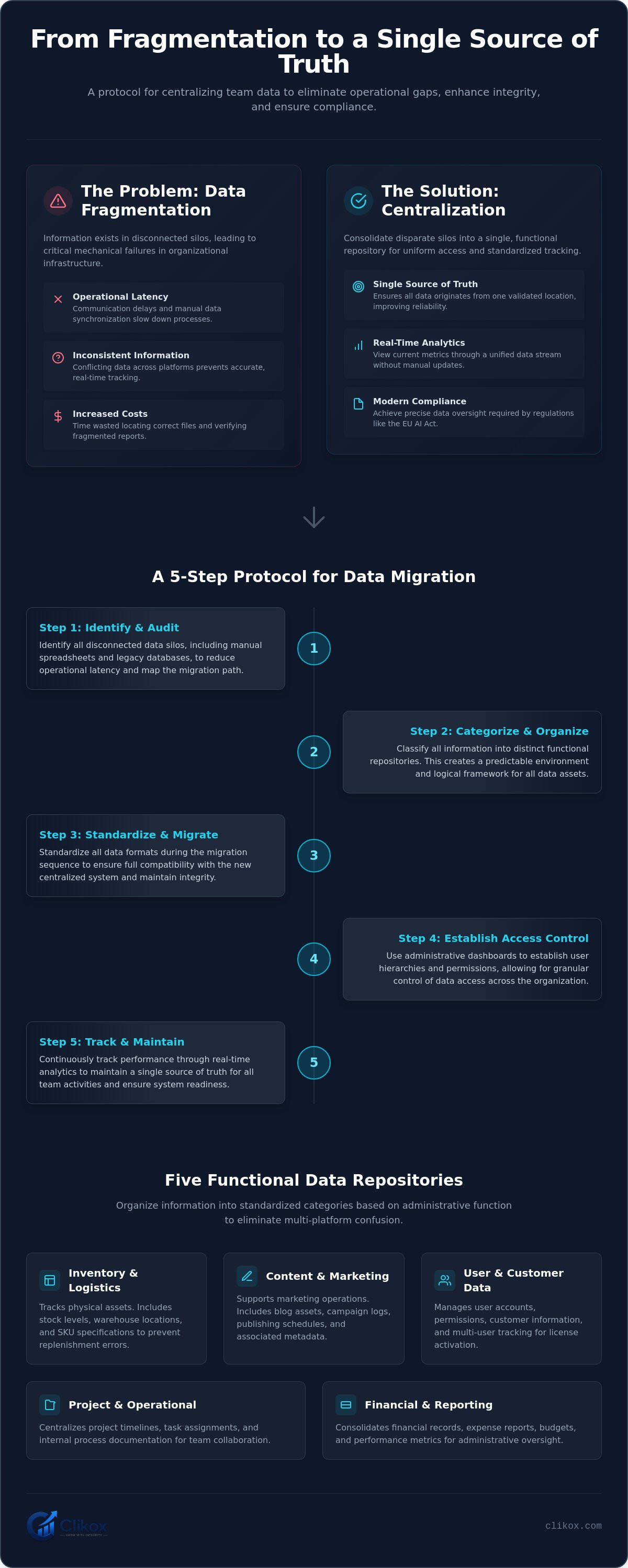
Data fragmentation is the state where information exists in disconnected silos. This condition occurs when teams use disparate platforms for individual tasks. Fragmented systems increase operational latency. They reduce data integrity across the organization. Centralization is the process of consolidating these silos into one repository. This guide explains how to centralize team data to restore system efficiency. A centralized system enables uniform access. It provides standardized data tracking for all administrative units. It eliminates the need for cross-platform reconciliation.
The Functional Impact of Data Silos
Silos create redundant data entries across different team units. One unit might record inventory levels in a spreadsheet. Another unit might track the same items in a separate database. These entries often conflict. Information latency occurs when data must be manually synchronized between these points. This manual process introduces human error. It prevents the system from functioning as a cohesive unit. It's a functional barrier to information flow. Teams don't have to tolerate these delays if they implement a systematic protocol.
Operational costs increase when silos persist. Teams spend time locating the correct version of a file. Administrators can't verify the accuracy of fragmented reports. This lack of transparency slows decision-making. Standardizing data into a functional repository removes these barriers. It ensures that every team member accesses identical information. The system maintains a constant state of readiness. It removes the friction associated with fragmented communication channels. Centralization creates a predictable environment for all users.
Primary Objectives of a Centralized Data Strategy
The primary objective is to establish a single source of truth for all administrative functions. This ensures that all data points originate from one validated location. A centralized strategy enables real-time analytics through a unified data stream. Managers view current metrics without waiting for manual updates. This visibility is essential for tracking five distinct data types within the system. These types include inventory records and blog content. The system doesn't require manual intervention to maintain this accuracy.
Centralization reduces the time required for data retrieval and reporting. Users find information through a standardized interface. This reduces administrative overhead. It improves the reliability of team outputs. You must audit all existing data sources to begin this process. This audit identifies manual spreadsheets and legacy databases. The goal is a functional, automated infrastructure. Use an administrative dashboard for this oversight. This dashboard provides a mechanical view of all organizational data points. It's the primary tool for maintaining data integrity.
Categorizing Team Data into Functional Repositories
Effective centralization requires the categorization of diverse data types. Standardized repositories allow for the management of five distinct data categories. These categories organize information based on administrative function. Organizations often struggle with Unlocking The Power Of Data because they lack a systematic taxonomy. This guide demonstrates how to centralize team data by applying a logical framework to fragmented assets. The system must accommodate both tangible and intangible information types. It eliminates the confusion of multi-platform storage.
Inventory data includes stock levels, locations, and SKU specifications. This category tracks physical assets within the digital environment. Accurate SKU management prevents replenishment errors. Location tracking ensures logistical efficiency across multiple warehouses. Content data includes blog assets, campaign logs, and publishing schedules. These assets support marketing operations. Storing metadata alongside content files improves searchability. Campaign logs provide a historical record of previous team actions. This categorization creates a predictable environment for data retrieval.
Standardizing Inventory and Logistics Data
Organize physical assets into searchable digital records. This process converts physical status into actionable data points. Track movement and status changes within a centralized log. This log records every transaction. It eliminates the need for manual audits. Implementing a team inventory management platform provides the necessary structure for these records. The platform serves as a repository for logistics data. It maintains a clinical history of all inventory movements. Centralized inventory tracking reduces the risk of stock discrepancies. It provides a standardized view of asset availability for all team members. The system ensures that stock data remains current and accessible.
Integrating Blog and Content Management
Store blog drafts and metadata alongside operational inventory. This integration creates a uniform data environment. Teams often use separate tools for content and stock. This separation causes administrative friction. Use software to manage blogs and inventory to maintain content consistency. This tool centralizes campaign data to track marketing performance in one place. It enables simultaneous monitoring of product availability and promotional efforts. Administrators manage license activations through a single dashboard. Clikox Inventory Software facilitates this level of integration. The system optimizes administrative oversight through Clikox Inventory Software for data consolidation. This software acts as the logical infrastructure for the centralization protocol. It supports the management of five distinct data types in one location. Real-time analytics are available through the integrated admin dashboard.
A Step-by-Step Protocol for Team Data Migration
Migration requires a clinical sequence. Audit all existing data sources first. Identify manual spreadsheets that contain critical team information. This audit reveals the extent of data fragmentation. You must centralize raw data from these disparate files into a unified format. This step is the foundation of how to centralize team data effectively. It removes the reliance on localized files that block information flow. A systematic audit ensures that no functional data is left in disconnected silos.
Standardize data formats to ensure compatibility with the new system. Check SKU codes for accuracy. Verify date formats across all spreadsheets. Ensure consistent naming conventions for all assets. This standardization prevents import errors. It maintains the integrity of the functional repository. Data types must align with the five categories established in previous steps. This alignment facilitates a seamless transition to the centralized dashboard. Use a standardized template for all incoming records.
Execute the migration using established protocols for importing inventory data from spreadsheets. This ensures a predictable data flow. Verify data integrity through a post-migration audit and count. Compare the final record count against the source files. Check specific data samples for accuracy. Any discrepancies require immediate correction within the new repository. The system's stability depends on the precision of this initial ingestion.
Auditing and Cleaning Legacy Data
Remove duplicate records from legacy spreadsheets before importing. Duplicates cause inventory discrepancies. Ensure all data fields match the target repository structure. Map source columns to the specific fields in the administrative dashboard. Identify obsolete data that doesn't require centralization. Archive old records to reduce system clutter. This cleaning process optimizes migration speed. It ensures only high-value information enters the new system. High-quality data is the primary requirement for functional oversight. Follow these steps for data cleaning:
- Deduplication: Identify and merge identical entries across all source files.
- Field Validation: Check for missing values in mandatory data fields.
- Format Normalization: Convert all text to a standard case and remove non-standard characters.
- Asset Verification: Confirm that all listed inventory items physically exist.
Executing the Migration Process
Use CSV or API-based methods for bulk data transfers. CSV files are standard for spreadsheet migrations. APIs allow for automated data streams from external tools. Activate software licenses for all team members before the migration begins. This ensures immediate access for the entire unit. The import process follows a linear path from file selection to field mapping and final ingestion. License activations must match the total number of users requiring dashboard access. Finalize the transfer by locking the source files to prevent further edits. This prevents the creation of new data silos during the transition period. The migration is complete once the admin dashboard displays the full dataset.
Establishing Access Control and User Permissions
Centralized data requires a structured hierarchy of user roles. This hierarchy ensures operational security across all team units. Admin dashboards allow for the granular control of data access. Administrators define specific permissions for each individual user. User registration protocols ensure that only authorized personnel enter the system. These protocols prevent unauthorized data entry from external sources. Permission levels prevent unauthorized modification of critical inventory or blog data. This is a necessary component for how to centralize team data within a multi-user environment. The system maintains a clinical record of all user interactions. It ensures that data remains consistent and protected from human error.
The administrative dashboard serves as the central control point for permissions. It allows for the rapid assignment of user rights. Administrators can toggle access to specific repositories. This prevents standard users from accessing sensitive logistics or financial data. The system enforces these boundaries automatically. It eliminates the need for manual oversight of user behavior. A centralized hierarchy is the most efficient method for managing large teams. It provides a stable framework for data governance. Establishing these protocols is the final technical hurdle in how to centralize team data. This framework is essential for maintaining the single source of truth.
Defining Administrative and Standard User Roles
Managers must define specific roles before granting system access. Assign admin status to managers responsible for data oversight. Admins possess full authority to modify system configurations and user lists. Limit standard users to viewing or editing specific data types. This restriction preserves data integrity by preventing accidental deletions. A Functional Analysis of Inventory Management Software for Data Centralization provides role structure examples. The system uses these roles to filter information based on user requirements. This filtering reduces administrative overhead for standard users. It streamlines the user interface for non-administrative personnel. Every role must align with a specific functional requirement.
Maintaining Data Security in Multi-User Environments
Maintaining data security is a continuous requirement in a centralized system. Implement license activation to track individual user instances. Each activation corresponds to a specific team member and workstation. Monitor user activity through the administrative dashboard log. This log records the time and nature of every data modification. It provides a transparent audit trail for all five data types managed by the platform. Establish protocols for revoking access when team members depart. This revocation must occur immediately to prevent unauthorized access. The system remains secure through strict adherence to these protocols. You can purchase License Activations to expand your team's access. This ensures that every user operates within a verified instance of the software. Precise tracking prevents the misuse of organizational assets.
Operating a Centralized Management Platform
Operating a centralized management platform is a continuous administrative requirement. The system functions as the primary infrastructure for all team activities. Use an administrative dashboard for real-time data tracking. This oversight ensures that the repository remains accurate and current. You've executed the protocol for how to centralize team data to reach this operational state. Monitor campaign analytics to evaluate team performance. The system provides objective metrics for decision-making. Maintenance involves regular software updates and license management. This prevents technical degradation of the functional repository. Standardize the addition of new data types to avoid future fragmentation. Every new entry must follow the established taxonomy.
The centralized model requires disciplined oversight to prevent the return of silos. Administrators must review system logs daily. They verify that all data ingestion points remain active. This process maintains the flow of information across the organization. It ensures that the single source of truth remains valid for all units. Operating the platform is a mechanical task. It relies on the systematic application of established rules. This approach preserves the stability of the data environment.
Utilizing Dashboards for Data Oversight
The administrative interface displays all five data types in a single view. This includes inventory records and blog content. Generating reports on inventory levels is a standard functional task. The dashboard tracks blog publishing status alongside stock movements. These reports provide a clinical overview of organizational health. Track license usage across the global team infrastructure. This tracking ensures that every user operates within a valid instance. The system maintains a directory of all active licenses. It allows for the rapid identification of unauthorized access attempts. This visibility is a core requirement for secure data management.
Ensuring Long-Term Data Integrity
Long-term stability requires periodic audits. Perform these audits to verify the accuracy of centralized records. Compare digital logs against physical assets. This verification maintains the single source of truth established during migration. Train new team members on the standardized data entry protocol. Consistency is the primary defense against data silos. Every user must understand the requirement for modular information delivery. Select a team inventory management platform that supports automated data tracking. Automated systems reduce the risk of human error. They provide a reliable foundation for all administrative tasks. The platform remains stable through disciplined operation. This discipline prevents the degradation of system utility over time.
Implementing a Functional Data Infrastructure
Data centralization is a functional necessity for organizational stability. You have reviewed the systematic protocol for how to centralize team data. This process requires the categorization of information into five distinct repositories. It involves a clinical migration from fragmented spreadsheets. You must establish a structured hierarchy of user roles to protect data integrity. These steps eliminate operational latency and prevent the return of information silos. The system maintains a constant state of readiness through this arrangement.
Centralize your team data with Clikox Inventory Software. This platform allows you to manage five data types in one location. It includes an administrative dashboard for comprehensive data oversight. Secure license activation ensures that all team members operate within a verified environment. This system provides the necessary infrastructure for a single source of truth. It tracks blog assets and inventory records simultaneously. You can monitor all team activities through a uniform interface.
The transition to a centralized management platform is a logical step for all administrative units. You can now maintain a stable and professional data environment. Your organizational infrastructure is now optimized for long-term efficiency. The system is ready for immediate deployment.
Frequently Asked Questions
What is the most efficient way to centralize team data?
The most efficient method is to implement a systematic migration protocol into a single functional repository. This approach eliminates disconnected silos and establishes a single source of truth. It requires auditing existing sources and standardizing all formats before ingestion into the management platform.
Can I manage both inventory and blog data in one place?
Yes. The system manages five distinct data types within a unified interface. This includes physical inventory records and digital blog assets. Consolidating these diverse types into one location reduces administrative overhead. It prevents the fragmentation of information across multiple platforms.
How do user permissions work in a centralized data system?
User permissions operate through a structured hierarchy of roles assigned by administrators. The dashboard allows for granular control over individual access levels. This system prevents unauthorized modifications to critical records. It ensures that team members only access data relevant to their specific functional unit.
Is it possible to migrate data from spreadsheets to a centralized platform?
Yes. Data migration from spreadsheets is a core step in how to centralize team data effectively. The process involves cleaning legacy records and using CSV or API-based imports. This transition replaces disconnected manual files with a stable, automated infrastructure for the entire team.
What are the benefits of an administrative dashboard for team data?
An administrative dashboard provides real-time oversight of all organizational data points. It enables managers to track inventory levels and monitor campaign analytics from a single interface. This visibility improves decision-making. It ensures data integrity across the global team infrastructure through constant monitoring.
How does license activation improve data security for teams?
License activation tracks individual user instances and specific workstations. This process ensures that only verified personnel access the centralized repository. Administrators use these activations to monitor activity logs. They can revoke access immediately when team members depart to maintain system security.
What types of data can be centralized using Clikox software?
Clikox software centralizes five primary data types in one location. These include inventory records, blog content, and administrative analytics. The platform serves as the logical infrastructure for managing both tangible assets and digital information. It provides a uniform environment for all team data requirements.
How do I track work progress once data is centralized?
Track work progress by monitoring the real-time unified data stream on the dashboard. The system displays current metrics and status updates for all team units. This centralized view eliminates communication delays. It provides a standardized method for evaluating operational performance and project completion.