
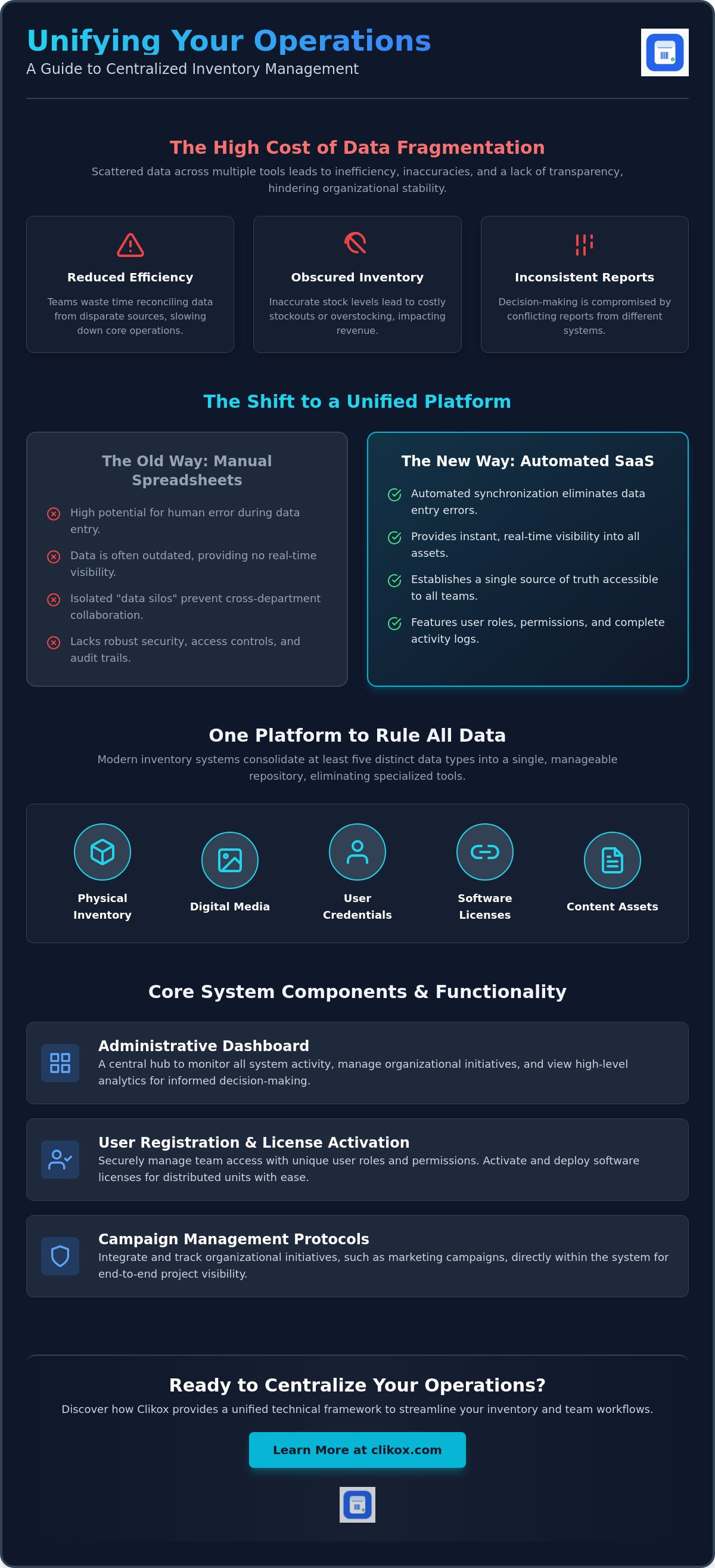
Data fragmentation across multiple tools reduces operational efficiency. It obscures inventory accuracy. You likely face challenges with inconsistent reporting. Team workflows often lack transparency. Managing software licenses for distributed units adds unnecessary complexity. Modern inventory management software must serve as a unified architecture for distinct data types. It must consolidate physical stock data and team collaboration frameworks into a single environment. This transition from manual tracking to automated systems is a standard requirement for organizational stability.
This analysis provides a systematic overview of inventory management software functionality. It outlines specific data categorization protocols. It defines centralized team collaboration frameworks. You'll learn how a centralized data repository improves operational control. We'll examine the requirements for standardized reporting and analytics. The text also covers simplified user role management for distributed teams. This systematic approach ensures that all organizational data remains accessible and ordered. It prioritizes functional clarity for every user role within the system. Each section delivers discrete data points to assist in the professional evaluation of your current infrastructure.
Key Takeaways
- Define core system components for centralized data tracking. Learn the protocols for user registration and license activation.
- Classify five distinct data types within a single platform. Integrate content assets like blog posts into your inventory management software.
- Replace manual spreadsheet entries with automated system synchronization. Reduce operational limitations through standardized data flows.
- Monitor system activity via the administrative dashboard. Implement campaign management protocols to track organizational initiatives.
- Configure Clikox technical frameworks for team environments. Execute license activations and system instance deployments for distributed units.
Functional Definition and Utility of Inventory Management Software
Modern inventory management software functions as a centralized data tracking system. It records organizational assets within a digital environment. The system consolidates information from disparate sources. It eliminates the need for fragmented data tools. This software provides a structured framework for asset categorization. Users interact with the system through a controlled interface. The system tracks physical goods. It also tracks digital assets. It maintains a chronological log of all changes. This log ensures data transparency across the organization.
Core system components include user registration and license activation. User registration establishes a unique identity within the database. This process ensures accountability for all data entries. Administrators monitor user activity through specific logs. License activation validates the software instance for a specific unit. It controls access to the system's functional modules. It prevents the use of unauthorized software copies. These components form the foundation of secure data management. License activation also facilitates the tracking of software deployments across multiple workstations. It's an essential step for organizational compliance.
Automated tracking reduces human error during data entry. Manual processes introduce inconsistencies. Effective inventory management software applies standardized protocols to every transaction. It ensures that data remains accurate over time. The system provides real-time visibility into organizational assets. Decision-makers view current stock levels without delay. This visibility supports efficient resource allocation. It reduces the risk of stockouts. It also prevents overstocking. The software generates alerts when assets reach thresholds. These alerts trigger automated replenishment workflows. Users don't need to monitor levels manually.
Core Objectives of Digital Inventory Systems
Digital inventory systems establish a single source of truth for organizational data. All departments access the same information. This consistency prevents data silos. The systems facilitate team access through structured user roles. Administrators assign permissions based on functional requirements. This structure maintains data integrity across distributed work environments. It prevents unauthorized modifications to the central database. The system records the time and origin of every update. This audit trail supports compliance with internal data policies. It's a reliable method for maintaining historical records.
The Role of SaaS in Modern Asset Tracking
The subscription-based model enables continuous software updates. It ensures the system remains compatible with current technical standards. Cloud-based storage allows for global data accessibility. Teams access the database from any location with internet connectivity. This model standardizes administrative workflows through modular interfaces. Each module performs a specific organizational task. The interface design prioritizes functional clarity. It removes unnecessary visual elements. The modular structure allows for the activation of specific features. This flexibility supports growth. It's a scalable solution for various business sizes.
Categorization of Multi-Data Types within a Unified Platform
Modern inventory management software supports five distinct data types. These types include physical inventory. They include digital media. They include user credentials. They include software licenses. They include content assets. A unified platform consolidates these datasets. It places them into a central repository. This architecture eliminates separate tracking tools. It provides a comprehensive view of organizational resources. Marketing teams use these systems. They manage digital production through the same interface. This integration ensures every asset follows a standardized protocol. It's a requirement for organizations seeking best inventory management software features. Centralization reduces data fragmentation. It improves the accuracy of organizational reports.
Organizing diverse datasets requires a systematic approach. The repository uses specific nouns of categorization. Each data point occupies a discrete field. This structure allows for rapid scanning. It facilitates automated data synchronization. Multi-data management is essential for content and marketing teams. These teams handle high volumes of digital assets. They require the same level of precision as warehouse managers. A unified platform provides this precision. It applies rigorous tracking to every asset type. This consistency supports a sense of professional efficiency. It maintains an atmosphere of reliable precision across the entire system.
Managing Blogs as Inventory
The system applies a specific protocol to blog content. It tracks content status. It tracks authorship. It tracks publication dates. Each blog post is a trackable inventory asset. The system stores these assets alongside traditional items. This centralization allows for unified asset monitoring. It optimizes workflows for content-heavy organizations. Users view the production status of all articles in real-time. This visibility prevents the loss of content data. It ensures that every digital asset remains part of the organizational record. Organizations often use Clikox Inventory Software to implement these content tracking protocols. The system manages content assets with the same accuracy as physical stock.
Data Structuring for Team Collaboration
Standardized templates facilitate repetitive data entry tasks. These templates follow a subject-verb-object format. They ensure that all users enter information in a uniform manner. This uniformity maintains the integrity of the central repository. Sharing mechanisms enable collaborative work. Multiple team members access the same data instance. This access occurs within a single platform. It eliminates the need for data exports. It reduces the risk of version control errors. Categorization strategies maintain repository order. Users apply specific labels to each asset. These labels group assets by department or project. This arrangement supports a directory-like rhythm. It allows for fast navigation through large datasets. Every piece of information remains a discrete unit. This structure reinforces the system's identity as an organized infrastructure.
Transitioning from Spreadsheet Systems to Automated SaaS Platforms
Spreadsheet-based tracking presents significant operational limitations. These files rely on manual data entry. Manual entry increases the probability of human error. Automated system synchronization replaces these manual steps. It ensures data consistency across the organization. Transitioning to inventory management software reduces operational complexity. It centralizes all tracking functions into a single interface. This transition requires the maintenance of historical data records. Migration protocols must preserve existing data integrity. Digital systems offer superior data retention compared to static files. They provide a chronological record of all asset changes.
Manual entry is a slow process. It consumes administrative resources. Automated systems capture data at the point of origin. This capture happens without human intervention. It ensures that the database reflects current stock levels. The transition from spreadsheets involves several technical steps. First, administrators export existing data into a compatible format. Second, the system validates the data for consistency. Third, the system imports the data into the centralized repository. This process maintains the continuity of organizational records. It prevents the loss of historical insights during the system upgrade. It's a foundational requirement for data-driven organizations.
Limitations of Manual Data Tracking
Multi-user spreadsheet environments suffer from version control issues. Different users often save conflicting versions of the same file. This conflict leads to data discrepancies. Fragmented data negatively impacts organizational decision-making. Stakeholders view outdated or incorrect information. This leads to operational deficiencies when software is applied to flawed manual processes. Security risks are also inherent in spreadsheet sharing. Unmanaged files lack granular access controls. Sensitive data remains vulnerable during external transmission. Spreadsheets don't offer audit trails for individual cell edits. This lack of transparency complicates the identification of data errors.
Efficiency Gains via Digital Platforms
Digital platforms automate recurring reporting and analytics tasks. The system generates reports according to a set schedule. It eliminates the need for manual calculations. Real-time data updates become available to all team members instantly. Every user sees the same data instance. This synchronization improves team coordination. Standardized data formats enhance searchability within the repository. Users locate specific assets using precise filters. The system organizes information into discrete units for rapid retrieval. Automated platforms also support multi-device access. Teams view inventory levels from mobile or desktop interfaces. This accessibility ensures that field units remain informed. It supports a consistent flow of information across all organizational levels. High-performance inventory management software stabilizes these administrative workflows.
Administrative Dashboard Functionality and Campaign Management
The administrative dashboard monitors system-wide activity. It provides a central view of all inventory operations. Administrators use this interface to track real-time data changes. The dashboard displays key performance indicators for organizational assets. It consolidates information from multiple departments. This view ensures that management remains informed of all system events. The dashboard also serves as the control center for License Activations. This function validates software instances for specific team members. It's a critical component of secure system management. It allows for the precise allocation of resources across the organization.
Campaign management protocols integrate directly into the inventory system. These protocols track specific organizational initiatives. Users assign assets to individual campaigns. This assignment allows for precise performance tracking. The dashboard manages customer segments and content segments. It categorizes data based on these specific groupings. This categorization supports targeted resource allocation. It provides a structured method for evaluating campaign success. The system records all data performance metrics. It stores these metrics in a centralized repository for future analysis. This integration ensures that marketing and inventory data remain synchronized.
Analytics provide a method for tracking data performance and team output. The dashboard visualizes these metrics through standardized charts. Administrators identify bottlenecks in the asset lifecycle. They monitor the speed of data entry tasks. The system tracks the frequency of asset updates. This information helps in refining organizational workflows. It ensures that the system operates at peak efficiency. The role of the dashboard extends to managing content segments. It tracks the distribution and engagement of digital assets. This functionality supports a comprehensive approach to asset management.
User Role and Permission Management
Administrators define access levels for individual users. These levels restrict or grant specific system permissions. This structure protects sensitive organizational data from unauthorized access. Security protocols govern all user interactions within the database. The system tracks user registration for every team member. It maintains a log of all active sessions. License allocation occurs through the administrative interface. Administrators distribute software access based on functional needs. This process ensures that every user has the necessary tools for their specific role. It maintains the integrity of the central system.
Analytical Reporting and Tracking
The system generates automated reports for data trend analysis. These reports identify patterns in asset usage. They highlight areas of operational inefficiency. Monitoring of campaign progress occurs through centralized metrics. These metrics provide objective data on team output. Administrators evaluate system utility through user activity logs. These logs record every transaction within the inventory management software. They provide an audit trail for data verification. Automated reporting saves time. It eliminates the need for manual data compilation. The system delivers reports according to a predefined schedule. This consistency supports stable organizational planning.
Technical Specifications of Clikox Inventory Software for Teams
Clikox Inventory Software manages five distinct data types within a local technical framework. This inventory management software operates entirely offline on Windows systems. It stores physical stock records and digital blog assets in a unified local database. The architecture prioritizes data privacy by keeping information in-house. Users execute License Activations to enable specific software instances. This procedure authorizes system use on up to two machines per license. System instance deployment involves a direct local installation process. It removes the dependency on continuous internet connectivity. This model provides stability for organizations with limited web access. It avoids the recurring costs associated with cloud-based subscriptions.
The operational benefits of the Clikox centralized work environment center on data control. A single local repository eliminates the risks of cloud-based data fragmentation. Teams access the same dataset without external synchronization delays. The system provides stoic reliability through its offline architecture. It values the user's time by delivering essential information through a direct interface. This configuration supports a highly organized infrastructure. It proves its competence through the systematic arrangement of all inventory offerings. Each piece of information remains a discrete unit within the system. This approach ensures that data remains accessible and perfectly ordered at all times.
System Architecture and Data Handling
The Clikox database structure organizes inventory items and blog content into discrete units. It uses a relational model to maintain data integrity. This structure facilitates the categorization of complex datasets. License management integrates directly into the administrative module. It tracks the status of all active keys. The platform supports scalability for solo users and large teams. Multiple staff accounts enable collaborative data entry within the local network. Each account maintains a unique activity log. This ensures accountability within the local environment. The system handles high volumes of data without performance degradation. It maintains a directory-like rhythm during all search operations.
Implementation and Support
The onboarding process for new team instances follows a standardized sequence. Users install the software on the target Windows machine. They then enter the activation key to validate the instance. Technical documentation provides instructions for every system function. Administrative support assists with complex configuration tasks. These resources ensure a rapid transition from legacy tools. You can find steps for license activation and system setup on the official portal. This documentation covers all aspects of system deployment. It helps teams maintain a perfectly ordered infrastructure. The software includes free lifetime updates to maintain technical currency. This ensures the long-term utility of the system instance.
Operational Stabilization through Data Centralization
Centralized data tracking replaces fragmented organizational tools. Modern inventory management software provides a unified architecture for diverse asset types. The system supports five distinct data types within a single local repository. These categories include physical stock items and an integrated blog management system. Administrators monitor all system activity through a centralized administrative dashboard. This oversight ensures that team workflows remain transparent and consistent across all units. Transitioning from spreadsheet systems to automated platforms reduces the probability of human error. It establishes a permanent record of all organizational transactions.
Standardized reporting and role management facilitate long-term operational stability. Systematic asset tracking supports precise resource allocation for every department. Users access all data through a direct and predictable interface. You can Access Clikox Inventory Software for Team Data Management to implement these administrative protocols. This software provides the infrastructure required for professional efficiency. It maintains data integrity within a secure and ordered environment. Systematic data management ensures that your organization remains prepared for future scaling requirements.
Frequently Asked Questions
What is the primary function of inventory management software?
The primary function of inventory management software is to provide a centralized repository for organizational data. It consolidates information from disparate sources into a single digital environment. The system records asset levels and tracks chronological changes. It maintains a historical log for all transactions. This functionality eliminates the need for fragmented tracking tools. It ensures data transparency across all organizational departments. Digital systems improve accuracy by applying standardized protocols to every entry.
Can Clikox manage non-physical assets like blog content?
Clikox manages non-physical assets including blog content through an integrated tracking module. Each content piece exists as a discrete unit within the local database. The system records authorship and publication status. It stores these assets alongside traditional inventory items. This centralization allows teams to monitor digital production with the same precision as physical stock. It optimizes workflows for organizations with high volumes of content assets. The system applies rigorous tracking to every asset type.
How does the license activation process work for teams?
The license activation process requires a local installation followed by the entry of a unique activation key. Each license authorizes use on up to two Windows machines. Administrators execute this process through the system interface. It validates the software instance for a specific unit. This procedure ensures that only authorized users access the organizational database. It facilitates the tracking of software deployments across distributed team environments. The process is a foundational requirement for secure data management.
What are the security benefits of using an admin dashboard?
The admin dashboard provides security benefits through granular access controls and activity logging. Administrators assign specific permissions to each user. This structure prevents unauthorized data modifications. The system maintains an audit trail of all interactions. It records the time and origin of every update. These logs support compliance with internal data policies. They protect sensitive organizational information from unmanaged access. The dashboard serves as the control center for all secure system operations.
Is it possible to migrate data from spreadsheets to Clikox?
Data migration from spreadsheets to Clikox occurs through a standardized import protocol. Users export existing data into a compatible file format. The system then validates the information for consistency. It imports the records into the centralized repository. This process maintains the continuity of historical insights. It reduces the operational complexity of transitioning to automated inventory management software. The migration protocol is designed to preserve data integrity throughout the transition process.
What data types are supported by the Clikox platform?
The Clikox platform supports five distinct data types within its unified architecture. These types include physical inventory and digital media. The system also manages user credentials and software licenses. Content assets such as blog posts comprise the fifth category. Every data type follows a standardized categorization protocol. This ensures that all organizational resources remain perfectly ordered within the local infrastructure. The system treats each piece of information as a discrete unit for rapid retrieval.
How are user roles and permissions structured within the system?
User roles and permissions are structured through a hierarchical administrative interface. Administrators define specific access levels based on functional requirements. Each role grants or restricts access to particular system modules. This structure ensures that team members only interact with relevant datasets. The system tracks all user registrations. It monitors active sessions to maintain database integrity across the organization. This arrangement supports a directory-like rhythm for administrative oversight.
Does Clikox provide automated reporting for marketing campaigns?
Clikox provides automated reporting for marketing campaigns through its administrative dashboard. The system generates metrics for specific organizational initiatives. It visualizes data performance via standardized charts. Administrators monitor campaign progress in real-time. This functionality eliminates the need for manual data compilation. It delivers objective data on team output according to a predefined schedule. The system maintains these metrics in a centralized repository for future analysis. This integration ensures marketing data remains synchronized.