

A simple file upload doesn't constitute a data migration strategy. Reliable system transitions require strict adherence to data formatting protocols to import inventory from spreadsheet files successfully. You recognize the risks of manual entry fatigue and data corruption. Inconsistent formatting across legacy sheets often leads to column mapping errors. These issues increase operational complexity and reduce system accuracy. The transition process requires a clinical approach to ensure functional clarity and data integrity.
This guide establishes the technical requirements and systematic workflows for moving records into centralized software environments. It provides a framework for transitioning from manual records to automated precision. We define the necessary standards for data validation and field alignment. The following sections outline the specific protocols for successful bulk migration. Readers will learn to implement a standardized data structure. This approach ensures the integrity of inventory records during the migration process. It minimizes the need for manual corrections. The system remains stable through the entire transfer sequence.
Key Takeaways
- Transition from manual tracking to centralized digital systems to eliminate data fragmentation.
- Use standardized CSV or XLSX formats and mandatory column headers to ensure system recognition.
- Execute pre-upload validation protocols to import inventory from spreadsheet files without data corruption.
- Map spreadsheet columns to system data fields via the Clikox administrative dashboard for accurate record placement.
- Integrate physical inventory and blog content simultaneously using the five distinct data type management protocols.
Objectives of Transitioning from Manual Spreadsheets to Centralised Software
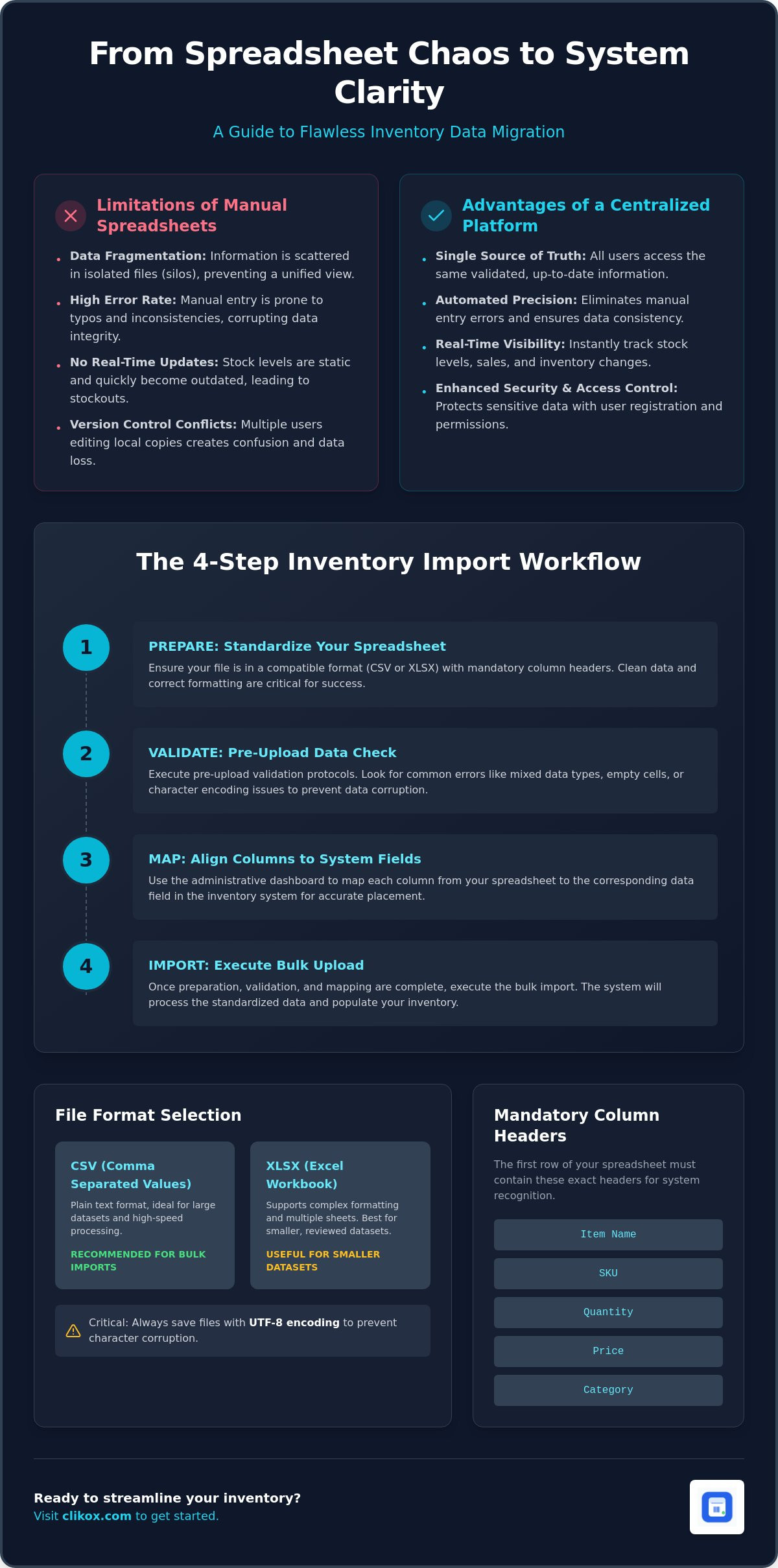
The transition from fragmented manual tracking to centralized digital systems is a technical requirement for business scalability. Manual spreadsheets create data silos. These silos prevent the efficient flow of information across organizational departments. Centralized software replaces these fragmented files with a unified database. This change establishes a stable foundation for data management. Users can import inventory from spreadsheet files to populate the new system environment. This process converts static rows into dynamic records within a structured database.
Spreadsheet-based inventory management presents specific limitations for growing teams. Individual sheets lack the capacity for simultaneous multi-user updates. This limitation leads to version control conflicts. Data becomes inconsistent when multiple team members modify local copies of a master file. Clikox Inventory Software addresses these structural weaknesses. It reduces operational complexity by consolidating all records into a single offline application. This consolidation improves data accessibility for authorized personnel. It removes the need for manual file sharing between departments.
Limitations of Manual Data Entry
Manual data entry is prone to human error. Typographical mistakes occur frequently during data input. These errors compromise the accuracy of stock levels and pricing records. Manual systems also lack real-time visibility. Stock levels remain static until a user performs a manual update. This delay results in inaccurate reporting and potential stockouts. Maintaining data integrity in multi-user environments is difficult without automated validation rules. The absence of a centralized inventory control system leads to fragmented record-keeping.
Advantages of Centralised Inventory Platforms
A centralized platform functions as a single source of truth. This concept ensures that all users access the same validated data points. Clikox utilizes user registration and License Activations to maintain system security. These features control access to sensitive inventory records. Administrative dashboards allow managers to monitor data changes effectively. This oversight ensures that the process to import inventory from spreadsheet files remains compliant with established protocols. Centralization creates a predictable environment for data retrieval and reporting.
Automated data tracking platforms offer distinct functional advantages. They provide consistent data structures for all inventory items. They eliminate the need for redundant data entry tasks. The systematic arrangement of information supports rapid decision-making. Professional efficiency increases when the system handles routine organizational functions. The focused utility of the software replaces the personality-driven workflows of manual management. This transition ensures long-term stability for the inventory database.
Standardised Formatting Requirements for Inventory Spreadsheets
System compatibility depends on precise file preparation. Users must adhere to Standardised Formatting Requirements to ensure data integrity during the migration. The database rejects files that do not meet structural criteria. This section defines the technical specifications for successful record ingestion. A disciplined approach to file structure prevents import failure. Every record must follow a uniform template. This uniformity allows the software to process information with automated precision.
File Format Selection: CSV vs. XLSX
The system supports Comma Separated Values (CSV) and Excel Workbook (XLSX) formats. CSV files contain plain text data. They are suitable for large-scale data migration. XLSX files support multiple sheets and complex cell formatting. CSV is preferred for high-volume imports because it minimizes processing overhead. Users must save files using UTF-8 encoding. This encoding prevents character corruption for international text strings. Incorrect encoding leads to system errors during the attempt to import inventory from spreadsheet files. The software processes CSV data with higher speed and reliability. XLSX is useful for smaller datasets requiring manual review before upload.
Standardising Column Headers and Data Fields
Mandatory column headers facilitate system recognition. The first row of the spreadsheet must contain specific identifiers. These identifiers include Item Name, SKU, Category, and Quantity. The system maps these headers to internal database fields. Numerical data requires specific formatting. Users should set cell categories to "Number" or "Text" to prevent truncation of leading zeros. This is critical for SKU accuracy. Clikox Inventory Software manages five distinct data types within a single file structure. This capability allows for the inclusion of blog-related data alongside physical inventory records. You can manage multiple data streams by following the standardized administrative protocols established for the software.
Consistent naming conventions are essential for inventory items. Item names must follow a predictable pattern. SKU identifiers must remain unique for every record. Duplicate entries cause database conflicts. A clinical approach to data naming prevents operational errors. The system uses these names for search and categorization functions. Inconsistent naming reduces the efficiency of the administrative dashboard. Standardized data structures support long-term system scalability. Every field must contain the correct data type. Text fields shouldn't contain numerical formulas. Numerical fields must contain only digits. This precision ensures a successful bulk migration. The system maintains stability through these rigid formatting rules. Each data point serves as a discrete unit of information.
Data Validation Protocols and Common Formatting Errors
Data integrity depends on rigorous pre-import audits. System failures occur when the source file contains structural anomalies. A standardized protocol identifies these anomalies before the software processes the file. Users must verify every data point to successfully import inventory from spreadsheet files. Primary failure causes include data type mismatches, invalid character strings, and duplicate identifiers. This section details the steps required to sanitize data for system ingestion. Precision at this stage prevents operational downtime and database corruption. The goal is a clean transfer of records into the centralized environment.
Managing Leading Zeros and Numerical Strings
Spreadsheet applications often categorize numerical strings as integers. This categorization removes leading zeros from SKU and barcode fields. A SKU labeled "00123" becomes "123" automatically. This change causes record mismatching and search failures. Users must format these columns as "Text" before data entry. For existing CSV files, use a formula to force text recognition. Verify all UPC and EAN codes for length consistency. Standard EAN-13 codes must contain exactly thirteen digits. UPC-A codes require twelve digits. Any deviation indicates a corrupted record. Consistent numerical strings are a technical requirement for system stability.
Sanitising Special Characters and Formatting
Special characters disrupt database integrity. Prohibited characters include semicolons, quotes, and backslashes. These symbols often function as delimiters in system code. Their presence in a data field triggers syntax errors during the upload process. Hidden formatting characters also present risks. Bold, italic, or custom font settings embed metadata into the cell. This metadata interferes with the plain text requirements of the import engine. Use the "Clear Formatting" function in your spreadsheet application. This action resets all cells to a neutral state. It removes hidden HTML tags and non-printable characters. Clean data ensures the system maps fields with automated precision.
Duplicate identifiers cause database conflicts and inaccurate stock reporting. Every item must possess a unique SKU or barcode. Use the "Highlight Duplicates" feature to identify overlapping entries. Delete redundant rows immediately. The system treats each row as a discrete record. Redundancy leads to inflated inventory values. A clinical removal of duplicates ensures the accuracy of the administrative dashboard. This task is essential for maintaining a single source of truth. Execute a final manual scan of the first and last ten rows. This verification confirms that the data alignment remains intact. A disciplined validation process reduces the need for manual corrections after the software migration.
Systematic Workflow for Executing Bulk Inventory Imports
The systematic execution of data migration occurs within the Clikox administrative dashboard. Users must first complete all License Activations to access full system functionality. The software interface provides a structured environment for file ingestion. You initiate the process by selecting the import module from the main navigation menu. This module handles the logic required to import inventory from spreadsheet files. Staged data remains in a temporary buffer before final commitment to the database. This buffer allows for a final review of the structured records. The system ensures that every entry follows the established database schema.
Column Mapping and Data Alignment
The mapping interface aligns spreadsheet headers with system fields. This step ensures that data resides in the correct database tables. Users select the corresponding system field for each spreadsheet column from a dropdown menu. Optional columns may remain unmapped if the data isn't required for core operations. The system requires the assignment of data types during this phase. Text fields must map to string variables. Numerical fields must map to integer or decimal variables. Correct alignment prevents data truncation and type mismatch errors. The system validates these assignments in real-time. This alignment phase is the most critical stage of the migration workflow.
Error Resolution and Post-Import Verification
The system generates error logs during the staging phase. These logs identify specific rows that failed validation. Common errors include missing mandatory fields or invalid character strings. Users can interpret these logs to pinpoint data anomalies. The software allows for the correction of specific rows within the interface. This feature removes the need to re-upload the entire file. After resolving errors, the user executes the final migration command. Post-import verification involves a comparison of the record count in the source file and the system database. The totals must match exactly to confirm a complete transfer.
The system interface displays a progress bar during the upload sequence. This monitor provides real-time feedback on the ingestion speed and completion percentage. Users shouldn't interrupt the process while the progress bar is active. Interruption can lead to partial data sets and database fragmentation. The system maintains a log of the entire session for administrative audit purposes. This log serves as a permanent record of the data ingestion event.
Spot-checking imported records is a mandatory protocol. Select a random sample of ten percent of the imported records. Compare the system values against the original source spreadsheet. Verify that SKUs, item names, and quantities match exactly. This verification confirms the accuracy of the mapping logic. The administrative dashboard provides a summary view of the new records. Successful migration results in a standardized data structure across the entire inventory set. This process concludes the technical transition to import inventory from spreadsheet data into a professional environment.
Integrating Multi-Data Types within Clikox Inventory Software
Clikox Inventory Software manages five distinct data types within a single application environment. This multi-data capability differentiates the system from traditional stock trackers. The software architecture supports the simultaneous ingestion of physical inventory and digital content. Users can import inventory from spreadsheet files that contain both product specifications and marketing assets. This integration establishes a unified administrative framework. It removes the necessity for maintaining separate software for inventory and content. The system processes all data points with uniform precision.
Managing Blogs and Inventory in a Unified Space
Inventory records and blog entries share a common structural logic within the database. Both data types utilize unique identifiers and categorical tags for organization. The mapping protocols established in previous sections apply to all five data types. Users categorize multi-data type repositories via the administrative dashboard. This unified approach generates significant efficiency gains. One software instance handles two disparate organizational workflows. The database maintains functional clarity across all records. Consistent data structures ensure that the system remains stable during high-volume operations.
License Activations for Team Collaboration
License Activations facilitate multi-user participation in the data management process. Each activation grants a team member access to the centralized system. Team roles influence the visibility of the imported data sets. Administrative controls define the permissions for modifying stock levels and content entries. This hierarchical access model ensures data security. It prevents unauthorized changes to the system state. The procedure for activating licenses for new software instances is a technical requirement for team expansion. This protocol maintains the integrity of the single source of truth.
A centralized platform offers specific advantages for organizational management. These benefits include:
- Coordination of marketing content with real-time stock levels.
- Unified tracking of inventory movement and content engagement.
- Elimination of data silos between departments.
- Consistent reporting through an integrated analytics engine.
The software operates as an invisible architect of data. It provides the essential infrastructure for managing complex information sets. Users rely on the system for automated precision in record-keeping. The process to import inventory from spreadsheet data concludes with the verification of all multi-data types. Successful integration results in a perfectly ordered system. This systematic arrangement values the user's time by providing direct access to essential information. The transition to a centralized software environment is now complete.
Implementing Centralized Inventory Controls
The transition to a centralized database requires adherence to rigid formatting standards. Successful data migration depends on precise column mapping and pre-import validation. You must verify all numerical strings and special characters to prevent system errors. This systematic approach ensures the integrity of every record during the ingestion process. The software provides a multi-user data tracking platform for organizational efficiency. It offers centralized management for five distinct data types within a single environment. This integrated blog and inventory system eliminates the need for redundant administrative tools. You can import inventory from spreadsheet files to establish a single source of truth for your operations. The administrative dashboard monitors all changes with automated precision.
Access the Clikox Inventory Software Administrative Dashboard to initiate your data migration. This tool establishes a stable infrastructure for long-term scalability. The system remains ready for immediate deployment. Precise data management supports professional efficiency in every department.
Frequently Asked Questions
How do I import inventory from an Excel spreadsheet to Clikox?
Navigate to the import module within the Clikox administrative dashboard to initiate the process. Select your source file and follow the mapping prompts to align your data. This module facilitates the process to import inventory from spreadsheet files into the centralized database. The system validates the file structure before finalizing the record ingestion. Ensure the file adheres to the mandatory column header requirements defined in the software documentation.
Can I update existing inventory items using a spreadsheet import?
Yes, the system supports record updates through the bulk import feature. The software uses the SKU as a unique identifier to match incoming data with existing records. If the system detects a matching SKU, it overwrites the current data fields with the new information from the spreadsheet. This protocol ensures that stock levels and pricing remain current across the entire database without manual editing. It maintains a single source of truth.
What file formats are supported for bulk inventory uploads?
Clikox supports Comma Separated Values (CSV) and Excel Workbook (XLSX) formats. CSV files are recommended for large-scale data migration due to lower processing overhead. XLSX files are compatible for smaller datasets that require specific cell formatting. Both formats must use UTF-8 encoding to prevent character corruption during the transfer. The software rejects unsupported file extensions to maintain database integrity and system stability. Each format serves specific organizational needs.
How does the system handle duplicate SKUs during the import process?
The system identifies duplicate SKUs during the staging phase of the upload. It generates an error log for any records that contain overlapping identifiers. Users must resolve these conflicts by assigning unique SKUs or consolidating the records before completion. Duplicate entries cause database conflicts and inaccurate reporting. The software prevents the finalization of the import until all duplicate identifier errors are cleared. This ensures the accuracy of the administrative records.
Is it possible to import blog content and inventory data simultaneously?
Yes, the software manages five distinct data types within a single import process. You can include blog content and physical inventory records in the same source file by following the multi-data type template. Use the mapping interface to assign columns to the correct content or inventory fields. This capability allows for the unified management of disparate workflows within a centralized platform. It improves operational efficiency by consolidating administrative tasks.
What happens if my spreadsheet contains leading zeros in the item codes?
Standard spreadsheet software often removes leading zeros by treating codes as integers. This action results in corrupted SKU or barcode data. You must format these columns as "Text" before you import inventory from spreadsheet files. The system requires exact string matches for identifier fields. Verifying these codes during the data validation phase prevents record mismatching and search failures in the dashboard. Correct formatting is a technical requirement for system stability.
How do I map my custom spreadsheet columns to Clikox data fields?
Use the mapping interface provided in the administrative dashboard after uploading your file. The interface displays your spreadsheet headers alongside a dropdown menu of system fields. Select the corresponding system field for each column to align your data accurately. You can also assign specific data types such as text or integer during this step. Correct mapping ensures that information resides in the appropriate database tables. The system validates these assignments in real-time.
Do I need a specific license activation to perform bulk data imports?
Full system functionality requires valid License Activations for each software instance. Bulk data import features are accessible to authorized users once the system is activated. License status is verified through the administrative dashboard. Activating the software enables team-wide access to the centralized database and its management modules. This activation is a technical requirement for executing systematic data migration workflows. It ensures the software is ready for professional use.