

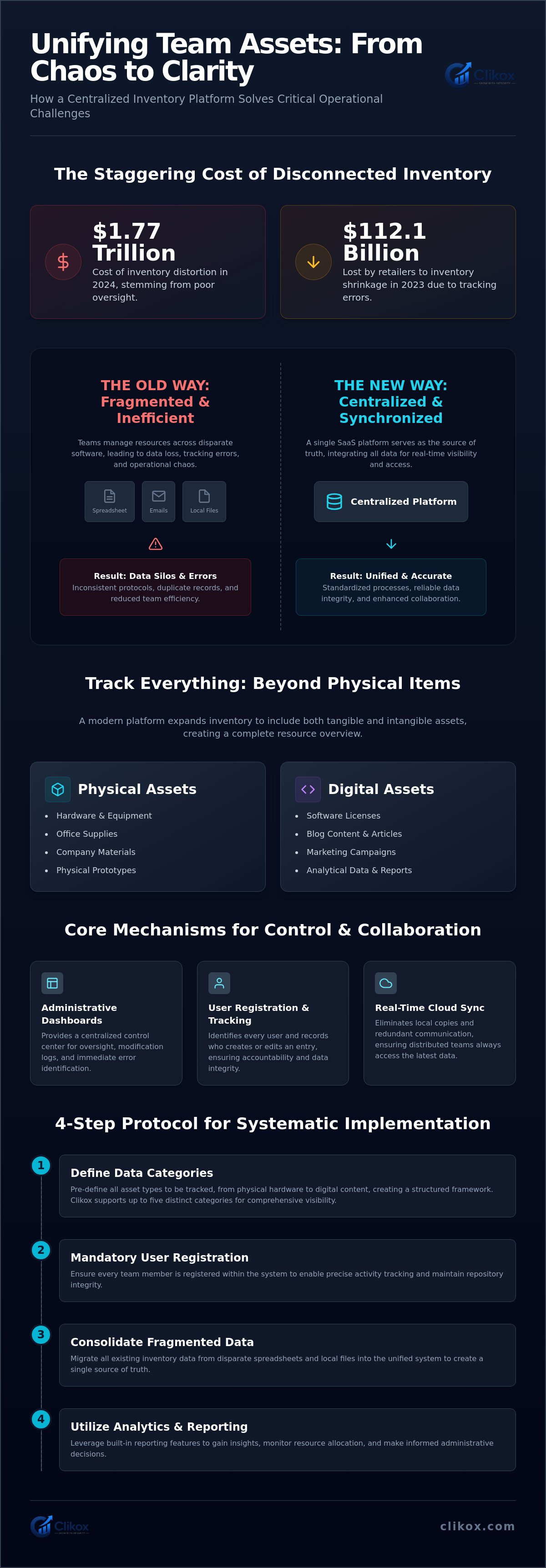
Inventory distortion costs reached 1.77 trillion dollars in 2024. Retailers also lost 112.1 billion dollars to inventory shrinkage in 2023. These figures demonstrate the risks of insufficient asset oversight. Most teams currently manage resources across disparate software tools. This fragmentation leads to data loss and tracking errors. A centralized team inventory management platform standardizes these processes. It creates a single point of truth for physical hardware and digital licenses. It's a functional necessity for maintaining operational precision.
You understand that inconsistent tracking protocols reduce team efficiency. This article defines the structural requirements and operational benefits of a centralized inventory system. It provides a framework for managing non-physical assets like digital content. We preview the implementation of user-level access controls. The discussion includes the setup of reliable analytics and reporting features. These modules provide the data required for informed administrative decisions. The following sections detail the specific technical components of the framework.
Key Takeaways
- A centralized team inventory management platform integrates physical and digital data types into a single SaaS environment.
- Administrative dashboards facilitate oversight through structured user registration and activity tracking protocols.
- Consolidating fragmented spreadsheets into a unified system reduces operational complexity and data loss risks.
- Systematic implementation requires the pre-definition of data categories and mandatory participant registration.
- Clikox Inventory Software supports five distinct data categories to ensure comprehensive resource visibility.
Defining the Functional Scope of a Team Inventory Management Platform
A team inventory management platform operates as a centralized SaaS environment. It replaces local files with cloud-based storage. This system serves as a single source of truth for all users. Teams utilize this infrastructure to track work. They use it to share data. They use it to manage resources. The platform provides a structured framework for oversight. It eliminates data silos. Modern inventory management software focuses on data categorization. It maintains a clinical record of assets. This approach ensures that every team member accesses identical information. Reliability depends on the stability of this central node. It's the primary repository for all operational intelligence.
The platform functions through a modular architecture. It treats every item as a discrete data unit. This allows for rapid scanning. It allows for rapid retrieval. Users navigate the system via a standardized interface. The software prioritizes utility. It presents information in a direct format. This clinical presentation reduces cognitive load. It's a tool built for administrative precision. The platform supports the systematic arrangement of work outputs. It facilitates the transition to automated tracking. This transition improves overall data integrity. It creates a predictable environment for data entry. The system remains ready for immediate use.
Categorization of Diverse Data Types
Traditional systems often limit tracking to physical items. A comprehensive team inventory management platform expands this definition. It facilitates the organization of multiple data types. Physical inventory tracking involves supplies. It involves equipment. It involves materials. Digital inventory includes blog content. It includes marketing campaigns. It includes analytical data. The system organizes up to five distinct data types. These categories include inventory and blogs. This modular design allows for the categorization of non-physical assets. It provides a uniform protocol for managing resources. Users assign specific attributes to each entry. This creates a standardized database. It ensures that digital content receives oversight. The system maintains order across all asset classes.
Utility for Distributed and Remote Teams
Cloud-based access allows for real-time synchronization. Distributed teams require this immediate availability. Centralization reduces the requirement for redundant communication. Users don't request status updates via email. The platform displays current data states automatically. Standardized data entry ensures consistency. It removes individual variations in reporting. This systematic approach supports remote collaboration. Every participant follows the same input protocols. The software updates the central record instantly. This ensures that data remains current for all participants. The result is a reliable data environment. It functions as a stable infrastructure for the organization. The system operates with automated precision.
Operational Mechanisms for Multi-User Data Tracking and Sharing
Multi-user operations depend on a stable team inventory management platform. This infrastructure supports simultaneous data access. It eliminates the risk of conflicting updates. The administrative dashboard serves as the control center. It displays a log of all modifications. This transparency is critical for large teams. It allows for the immediate identification of errors. Users follow a standardized path for data retrieval. This path remains consistent across all departments. The software prioritizes functional clarity over complex navigation. It's an efficient tool for resource coordination. Organizations use a web-based inventory optimization system to maintain these standards across distributed locations. It provides a stable foundation for collective data management.
A team inventory management platform requires structured user registration protocols. This ensures that every participant is identified within the system. The platform records the identity of the user who creates or edits an entry. This level of oversight maintains the integrity of the central repository. It prevents the creation of duplicate records. Data sharing occurs through this unified environment. Users don't store local copies of work files. They access the most recent version on the server. This arrangement ensures that everyone works from the same facts. Teams seeking this level of precision use Clikox Inventory Software to manage their internal resources.
User Roles and Permission Structures
Permission structures define the level of access for individual team members. Administrators manage system-wide settings. They oversee license activations. They control the addition of new data categories. Standard users execute data entry. They perform inventory tracking tasks. These users modify records based on operational needs. View-only roles allow for data observation. These participants cannot modify existing information. This hierarchy protects sensitive data. It ensures that only authorized personnel make changes. The system enforces these rules automatically. It creates a secure environment for collaborative work. Every role has a specific functional boundary.
Centralized Workflows for Distributed Units
Teams track and share work in one place. This maintains operational speed. The system records historical data for audit purposes. It documents every change made to a record. This audit trail is essential for reporting. Automated notifications alert users to changes in inventory status. They provide updates on content progress. This reduces the need for manual check-ins. Distributed units remain synchronized through these automated triggers. The platform acts as a silent coordinator. It manages the flow of information without human intervention. This clinical precision prevents errors. It ensures that all team members work with current facts. The system remains reliable under heavy usage.
Mitigating Complexity in Centralized Team Workflows
Operational complexity increases when data is stored in fragmented locations. Teams often maintain separate files for different asset categories. This fragmentation leads to administrative friction. It creates delays in resource allocation. A team inventory management platform replaces disparate spreadsheets with one system. It provides a single environment for all tracking requirements. This consolidation eliminates the need for cross-referencing multiple files. It reduces the likelihood of data omission. Consistent data structures allow for rapid scanning. They facilitate immediate information retrieval. Users interact with a stable data architecture. This stability supports high-volume operations. The platform functions as a silent infrastructure for the organization. It maintains order through systematic arrangement.
Standardized templates reduce the time required for data input. Every entry follows a fixed pattern. This pattern remains uniform across the entire system. Users don't decide on formatting. The software enforces formatting rules automatically. This approach ensures that all records are compatible. It allows for the generation of accurate reports. Data remains clean and accessible. The system operates with mechanical precision. It values the user's time by providing a direct path to information. There are no unnecessary steps in the workflow. Each action serves a specific administrative purpose. The platform remains ready for immediate use. It provides a reliable framework for daily tasks.
Centralized workflows eliminate the need for manual synchronization. The software handles data updates in the background. It ensures that all connected devices display the same information. This automated precision removes the possibility of human oversight. It creates a predictable environment for data management. Teams rely on this consistency to maintain operational speed. The platform acts as a disciplined architect of information. It organizes data into discrete, manageable units. This organization supports rapid decision-making. Administrators view the entire resource landscape from one screen. It's a stable foundation for team collaboration. The system proves its competence through brevity and systematic arrangement.
Transitioning from Spreadsheets to Digital Platforms
Spreadsheets lack the security of multi-user permission controls. They provide no mechanism for restricting access levels. Manual data entry in shared files often leads to versioning errors. Digital platforms provide automated data integrity checks. The system validates inputs against predefined rules. This prevents the entry of corrupt data. It ensures long-term data reliability.
Reducing Cognitive Load Through Modular Design
Modular interfaces display only the information necessary for the task. They filter out irrelevant data fields. Predictable layouts improve the efficiency of daily administrative functions. The system prioritizes functional clarity over aesthetic flourishes. Each screen follows a subject-verb-object logic. This design supports rapid scanning. It allows for the processing of large data sets without fatigue.
Protocol for Implementing a Centralized Inventory System
Implementation of a team inventory management platform requires a systematic approach. It starts with the definition of data categories. It requires the completion of user registration for all participants. License activation ensures the software instance is ready for deployment. The process follows a fixed timeline. It maintains a focus on functional readiness. Data migration occurs through a standardized import protocol. This protocol prevents the entry of corrupt records. It ensures that the central repository remains clean from the start. The system validates each imported field against predefined structures. This validation is an automated security measure. It protects the integrity of the database.
The implementation framework prioritizes long-term stability. It avoids experimental configurations. Administrators establish a baseline for all future data entry. This baseline serves as the organizational standard. Team members receive instructions on the use of the administrative dashboard. This training minimizes the risk of user error. It ensures that the system operates at peak efficiency. Every step in the protocol is discrete. Each action contributes to the integrity of the total system. The training covers data entry. It covers report generation. The training ensures the team inventory management platform remains accurate. For organizations ready to deploy, purchase Clikox Inventory Software license activations to begin the setup process.
Data Categorization and Structuring
Users define fields for physical inventory. They define fields for blog content. Consistent naming conventions are established. This prevents the creation of ambiguous records. The system organizes data into five primary categories. This structure improves the speed of information retrieval. It creates a predictable environment for all users. The categorization protocol is literal and precise. It defines the limits of the data environment. Users follow these definitions to maintain system order. This order supports rapid scanning during daily operations.
License Activation and User Onboarding
Administrators activate licenses to enable multi-user functionality. It's a technical requirement for team collaboration. New users register through a secure portal. This portal grants access to the team workspace. The administrative dashboard tracks license utilization. It monitors user permissions. This oversight ensures that access remains within defined boundaries. The system manages these variables automatically. It provides a real-time record of active participants. This record is essential for administrative audits. It maintains a clinical overview of system usage.
Technical Specifications of Clikox Inventory Software for Distributed Teams
Clikox Inventory Software provides a centralized platform for data management. It supports five data types. These categories include physical inventory, blogs, and marketing campaigns. The system utilizes a modular architecture. This allows for rapid data retrieval. License activations allow for scalable team access. Administrators control these activations through the central portal. The platform functions as a stable infrastructure for distributed teams. It removes the requirement for local data storage. Every participant accesses the same server record. This ensures that every team inventory management platform user works from identical facts. The software maintains a clinical record of all entries. It operates with automated precision.
Integrated campaign management and analytics provide operational oversight. The system tracks resource utilization across all categories. It generates reports based on user-defined parameters. These reports provide the data required for resource allocation. The platform maintains a neutral voice. It prioritizes functional clarity over visual flourishes. This approach reduces cognitive load for the administrator. The system remains ready for high-volume data processing. It records every modification for audit purposes. This ensures long-term data integrity. The platform acts as a silent architect of information. It organizes data into discrete units. This organization supports rapid decision-making.
Integrated Blog and Inventory Management
Users manage content and physical stock in one centralized space. The system facilitates the organization of blogs alongside inventory data. This dual functionality eliminates the need for separate software instances. It provides a uniform protocol for managing resources. Users assign specific attributes to each entry. This creates a standardized database. This integration is detailed in the functional analysis of inventory management software. It provides a technical framework for data centralization. The system maintains order across all asset classes.
Administrative Dashboard and Reporting
The Clikox dashboard provides real-time visibility into team data. It functions as the central node for all administrative tasks. Users generate reports to track campaign progress. They monitor inventory levels. The dashboard presents data in a modular format. This layout supports rapid scanning. The platform is a software to manage blogs and inventory designed for efficiency. It records every modification for audit purposes. This ensures long-term data integrity. The system remains reliable under heavy usage. It proves its competence through brevity and systematic arrangement.
Establishing Operational Stability Through Centralization
Centralized data management eliminates the risks associated with fragmented resource tracking. A team inventory management platform provides the technical infrastructure required for multi-user collaboration. It replaces manual spreadsheet updates with automated integrity checks. This transition ensures that all participants access current data states from a single repository. The system maintains order through predefined data categories and structured user permissions. It provides a stable foundation for administrative oversight.
Clikox Inventory Software facilitates this level of administrative control. It supports the centralized management of 5 data types. These categories include physical inventory and digital blog content. The platform includes an integrated license activation system for teams. Administrators utilize a comprehensive dashboard to monitor campaign progress and stock levels in real time. These technical specifications provide a reliable framework for distributed operations. Standardizing your data environment is the final step toward functional efficiency. It creates a predictable workflow for every team member. Register for Clikox Inventory Software to begin your implementation. Your organization is ready for systematic optimization.
Frequently Asked Questions
What is a team inventory management platform?
A team inventory management platform is a SaaS-based system designed to centralize the tracking of various data types. It allows multiple users to access, organize, and share information in a single repository. This software replaces traditional spreadsheets and fragmented tools. It provides features such as user registration and license activation to maintain data integrity across a distributed team. The system functions as a stable infrastructure for the organization.
Can this software manage both physical inventory and digital blogs?
Yes, advanced platforms like Clikox are designed to handle up to five distinct data types. This includes traditional physical inventory, such as tools and supplies, as well as digital assets like blog content. Centralizing these diverse data types allows teams to manage their entire workflow in one location. This integration reduces the need for multiple subscriptions and simplifies administrative tasks. It provides a uniform protocol for managing all resource classes.
How does license activation work for teams?
License activation is a procedural step that enables a specific software instance for use. For teams, this typically involves a primary administrator activating a multi-user license for the organization. Once activated, the team can register individual users and assign them specific roles. This process ensures that the organization has the necessary permissions to track and share work within a secure environment. It is a fundamental requirement for multi-user functionality.
Why is an administrative dashboard necessary?
An administrative dashboard provides a centralized view of all system activities. It allows administrators to manage customer content, monitor user permissions, and view data analytics. Without a dashboard, tracking changes across a team becomes difficult and prone to error. The dashboard serves as the primary control center for maintaining the accuracy and security of the team's data. It provides real-time visibility into the resource landscape for the administrator.
Is a team inventory platform better than a spreadsheet?
Digital platforms offer several advantages over spreadsheets, including real-time synchronization and multi-user access control. Spreadsheets are often limited to single-user editing and lack automated reporting features. A dedicated team inventory management platform provides a modular structure that is easier to scan and navigate. It also includes security features like license activation and encrypted user registration. The platform ensures that data remains clean and accessible for all registered participants.
How do teams share work in one place using this software?
Teams share work by entering data into a centralized repository that is accessible to all registered users. When one user updates an inventory item or a blog entry, the change is reflected immediately for the entire team. This eliminates the need for manual updates or file sharing via email. The system ensures that everyone is working with the most current data at all times. It maintains a consistent data state across all locations.