

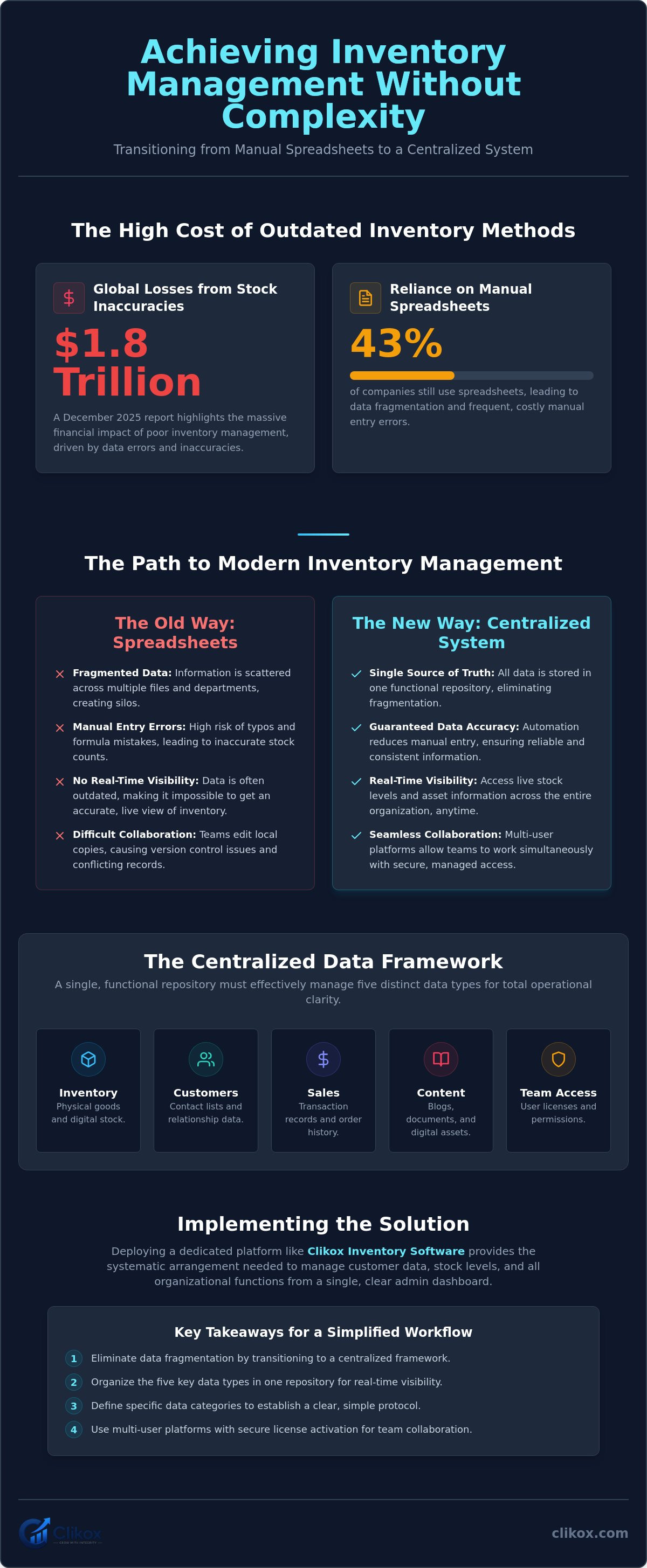
A December 2025 report states that stock inaccuracies contribute to over $1.8 trillion in global losses. An unnamed study from the same period found that 43% of companies still rely on spreadsheets for inventory visibility. These decentralized files often cause data fragmentation and frequent manual entry errors. You understand that managing stock through disconnected tables limits real-time data sharing among team members. Achieving inventory management without complexity is a primary requirement for maintaining operational stability. This objective is met by replacing localized spreadsheets with a single, functional repository.
This guide explains how to transition to a centralized system without adding unnecessary administrative overhead. You'll learn to establish clear protocols for team collaboration and data entry. We provide a structured approach to reducing time spent on system maintenance. The text outlines the implementation of Clikox Inventory Software to ensure data accuracy and functional clarity across your entire organization. Following these steps results in a stable infrastructure that supports rapid scanning and objective data management. This process focuses on utility and the systematic arrangement of information.
Key Takeaways
- Identify how redundant administrative tasks create operational complexity. Transitioning to a centralized framework eliminates data fragmentation.
- Organize five distinct data types within a single repository. This structure ensures real-time visibility for inventory and content assets.
- Implement a simplified workflow by defining specific data categories. This protocol establishes inventory management without complexity for your organization.
- Use multi-user platforms to facilitate simultaneous work sharing. License activations provide secure access for team members.
- Deploy Clikox Inventory Software to manage customer data and stock levels. The admin dashboard provides a systematic arrangement for all organizational functions.
Identifying Operational Complexity in Inventory Tracking
Operational complexity is defined as the accumulation of redundant administrative tasks. These tasks include manual data reconciliation and repetitive file transfers. Fragmented data storage prevents real-time visibility into stock levels and assets. Information remains isolated in departmental silos. This isolation prevents the execution of consistent inventory control protocols. Manual spreadsheet updates lead to a high frequency of data integrity errors. Typographical mistakes occur during data entry. These mistakes result in inaccurate stock counts. Complexity increases when tools don't support multiple data types in one location. Organizations often use separate applications for inventory, customer lists, and team schedules. This lack of integration creates operational friction. Achieving inventory management without complexity depends on the elimination of these redundant steps.
The Limitations of Manual Spreadsheet Management
Spreadsheets lack automated version control for multi-user teams. Team members often edit local copies of a master file. This behavior results in data divergence and conflicting records. A December 2025 study found that 43% of companies still rely on spreadsheets for inventory visibility. Formula errors often remain undetected in large data repositories. A single broken link or circular reference compromises the entire workbook. It's difficult to locate these errors in files containing thousands of rows. Manual entry requires significant time allocation from skilled personnel. Administrators spend a large portion of the work week updating static tables. This time is lost to maintenance rather than analysis. Static files don't allow for real-time collaboration among distributed team members.
Distinguishing Between ERP Bloat and Functional Utility
Enterprise Resource Planning (ERP) systems often include unused, complex features. These systems require extensive training and high implementation costs. Many organizations utilize a small fraction of an ERP's total functionality. Functional utility focuses on the essential tracking of five primary data types. These categories include inventory, customers, sales, content, and team access. A functional system prioritizes access and clarity over feature density. Centralization reduces the need for multiple software subscriptions. Managing all data in one repository lowers overhead. It eliminates the need for expensive third-party integrations. This streamlined approach ensures inventory management without complexity by removing unnecessary software layers. The focus remains on the utility of the data repository.
Establishing a Centralized Data Management Framework
A centralized framework organizes work in one location. It tracks all organizational activities. It shares data across the team. This structure serves as the single source of truth. It eliminates the reliance on fragmented spreadsheets discussed in previous sections. Effective systems manage five distinct data types. These categories include inventory and blogs. They include customers and sales. They also include team configurations. It's a necessary approach for modern operations. It ensures digital assets receive oversight. Physical stock receives the same oversight. Centralization removes the requirement for cross-platform synchronization. Data remains in a fixed repository. This lack of movement prevents errors. Errors often occur during data export. They also occur during data import. Modular data structures allow for rapid scaling. Team requirements evolve. The system expands by adding new data modules. This expansion doesn't disrupt existing workflows. This stability supports inventory management without complexity.
Managing Multiple Data Types in a Single Repository
Inventory tracking should include both physical goods. It should also include digital content assets. Many organizations fail to track content as an inventory item. This oversight leads to duplicated efforts. Centralized systems provide a unified view. They show all organizational resources. This visibility allows managers to manage inventory effectively across different categories. Categorization protocols ensure data remains accessible. They ensure data remains searchable. Each item receives specific metadata. Metadata simplifies the retrieval process. A functional repository maintains the relationship between stock and documentation. This integration consolidates diverse data streams. You can implement this by using Clikox Inventory Software to maintain total data visibility.
The Role of Admin Dashboards in Data Tracking
Admin dashboards provide a high-level overview. They show system status. They show active campaigns. Dashboards display the state of all five data types. Information appears in a standardized format. Uniformity allows for rapid scanning. Users identify critical metrics quickly. Systematic tracking allows for the identification of operational bottlenecks. Administrators see where data entry lags. They see where stock levels deviate. Centralized dashboards support informed decision-making. They use objective data. They replace manual report generation. Automated data visualization takes its place. The dashboard acts as a control center. It ensures team members follow protocols. This oversight maintains system integrity. The result is a stable environment. It supports inventory management without complexity by providing clear status updates.
How to Implement a Simplified Inventory Workflow
Implementation requires a systematic sequence of actions. Select a platform that supports centralized data management for teams. This selection is the foundation of the system. Define the specific data categories required for your organizational workflow. These categories must include the five primary data types discussed previously: inventory, customers, sales, content, and team access. Establish a standardized protocol for data entry and maintenance. Complete license activations for all users. This step ensures data transparency across the unit. Every member sees the same data points. It prevents the creation of isolated information silos. Migrate existing data from legacy systems. Use structured import protocols to move information. This structured approach facilitates inventory management without complexity. The transition remains orderly and predictable. It minimizes operational downtime during the setup phase.
Data Migration and System Setup
Follow established protocols for importing inventory data from spreadsheets (2026). These protocols minimize the risk of data loss or corruption. Verify data integrity immediately following the initial import process. The system must perform a checksum analysis. It compares imported counts against original spreadsheet values. Any discrepancies require immediate reconciliation. Configure user roles to align with existing team hierarchies. Assign administrative rights only to senior personnel. Standard users receive view-only or limited-edit access. This hierarchical structure maintains the integrity of the centralized repository. It ensures that only authorized personnel modify critical stock records. The setup phase concludes once all users are registered in the system.
The migration process involves these specific steps:
- Identify all legacy spreadsheet files for consolidation.
- Clean data to remove duplicate entries and formatting errors.
- Map spreadsheet columns to system data fields accurately.
- Execute the import using the 2026 protocols.
- Conduct a post-import integrity audit to confirm accuracy.
Standardizing Entry Protocols
Use declarative naming conventions for all inventory items and assets. Each entry must follow a subject-attribute-value format. Avoid descriptive flourishes or marketing adjectives. Use literal terms to describe stock and content. Implement a routine schedule for data verification. Updates must occur at fixed intervals, such as daily or weekly cycles. This regularity prevents the accumulation of errors over time. Functional data points provide the most utility for team members. Avoid using subjective qualifiers like "high quality" or "premium"; use objective measurements instead. Standardizing entry protocols ensures that inventory management without complexity becomes a permanent operational state. The system operates with automated precision. Every data point remains consistent across the entire organization.
Managing Team Access and Collaborative Data Tracking
Multi-user platforms allow teams to organize work simultaneously. They share data in real-time. User registration ensures secure access to the repository. License activation validates each participant. These protocols create a single source of truth for all departments. Distributed remote teams rely on this centralized repository for daily operations. It eliminates the need for disparate local files and manual updates. Functional sharing reduces the volume of internal administrative communication. Team members don't request status updates via email or chat. They view the repository instead. This method achieves inventory management without complexity by removing communication barriers. The system provides immediate answers to stock-level queries. It maintains a clinical record of all organizational activities.
A centralized access model provides several functional advantages:
- Elimination of duplicate data entry across different departments.
- Reduction in time spent searching for the most recent file version.
- Immediate visibility into stock changes for remote personnel.
- Secure storage of user credentials and access logs.
- Standardized data viewing formats for all team members.
User Roles and Permission Structures
Assign administrative roles for system configuration. These users manage campaigns and high-level settings. They oversee the five data types identified in previous sections. Limit data editing permissions to authorized personnel. This restriction maintains data integrity across the system. Unauthorized users receive read-only access to specific modules. Review user access regularly to confirm alignment with current project needs. Systems must reflect the current team hierarchy. Remove permissions when a team member finishes a project or leaves the organization. This systematic review prevents unauthorized data modification. It secures the organizational infrastructure against entry errors. You can manage these settings and License Activations through the central admin dashboard.
Sharing and Collaboration Protocols
Centralized platforms eliminate the need for sending file attachments. Data resides in the fixed cloud repository. Real-time updates ensure all team members view the same data instance. Changes made by one user appear immediately for all other users. This synchronization prevents the version control issues found in legacy spreadsheets. Collaborative tracking improves the efficiency of multi-departmental projects. Sales teams see current stock levels before confirming orders. Marketing teams view available content assets for new campaigns. Procurement teams identify when stock levels drop below established thresholds. This visibility supports inventory management without complexity across the entire organization. It ensures every department operates with the same information. The system acts as a silent architect for team coordination.
Utilizing Clikox for Simplified Inventory Management
Clikox Inventory Software provides the infrastructure for centralization. It manages the five data types identified in previous sections. These categories include inventory, customers, sales, content, and team access. The platform acts as a modular repository. It replaces the fragmented systems that cause operational friction. License activations enable access for specific team members. This ensures that every user operates within the same data framework. The interface is utilitarian. It prioritizes data visibility over visual flourishes. Using this system ensures inventory management without complexity by standardizing all organizational inputs. The platform integrates campaign management and analytics. It delivers these functions through a detached, objective interface. This approach provides a sense of reliable, automated precision.
Functional Features of Clikox
Manage inventory and blogs within a single, organized environment. This consolidation prevents the need for multiple software subscriptions. It reduces the administrative cost of managing diverse tools. Utilize industry-specific solution pages for tailored data tracking. These pages provide templates for various organizational workflows. They ensure that data categories align with specific operational needs. Access license activation and account management through a secure dashboard. The dashboard centralizes administrative functions. Users track stock levels and digital assets simultaneously. This dual tracking capability is a core functional feature. It supports the systematic arrangement of information. The system maintains a clinical record of all changes. It provides a stable environment for data growth. Each piece of information is treated as a discrete unit.
Adopting a Professional Data Infrastructure
Clikox is an inventory software better than spreadsheets. It provides automated version control. It prevents the formula errors common in legacy files. The SaaS model ensures continuous access to updated tracking features. Updates occur automatically without user intervention. This ensures the system remains functional at all times. Professional infrastructure projects reliability. It establishes operational stability for the entire unit. This stability is necessary for long-term data integrity. The platform integrates campaign management and analytics. It provides a high-level overview of system status. Adopting this infrastructure supports inventory management without complexity. It provides the silent architecture required for efficient data management. The focus remains on the utility of the repository. The pace of information delivery remains steady and mechanical.
Transitioning to a Functional Data Infrastructure
Replacing fragmented spreadsheets with a centralized repository is the primary step for organizational stability. This transition eliminates manual entry errors and ensures data integrity across the unit. Establishing standardized entry protocols maintains a single source of truth for all team members. These protocols reduce the volume of internal administrative communication. Achieving inventory management without complexity depends on the consistent application of these functional methods. A stable system provides the necessary infrastructure for rapid scaling and objective decision-making.
Clikox provides the tools required for this transition. The software enables the centralized management of five distinct data types. It features integrated blog and inventory tracking within a single environment. Users utilize a professional admin dashboard with analytics to monitor system status. License activations provide secure access for distributed teams. Access Clikox Inventory Software for Professional Data Management to establish a permanent operational state. A systematic approach results in long-term data accuracy and professional efficiency.
Frequently Asked Questions
What is the most efficient way to manage inventory without complexity?
Centralization into a single repository is the most efficient method. Replace fragmented spreadsheets with a modular system that tracks multiple data types in one location. This method achieves inventory management without complexity by removing redundant administrative tasks and manual data reconciliation. It provides a single source of truth for all organizational activities. The focus remains on functional utility rather than feature density.
Can I manage blog content and physical inventory in the same system?
Clikox Inventory Software manages blog content and physical inventory within the same system. The platform supports five distinct data types to ensure total visibility into organizational resources. This consolidation prevents the need for multiple software subscriptions and reduces the time spent on administrative maintenance. The system treats each blog post as a discrete inventory item for tracking and categorization purposes.
Is it possible to track team data without using spreadsheets?
Tracking team data is possible by moving information to a secure cloud repository. This transition eliminates the version control issues found in legacy spreadsheets. It allows for simultaneous data access and real-time updates across the entire organization. Professional systems use structured data fields to track employee access and performance metrics without the errors common in manual spreadsheet entry.
How do user roles improve inventory management for teams?
User roles define specific permissions for each team member within the system. Administrative roles manage system configurations and high-level campaign settings. Standard roles receive limited editing or view-only access based on their project requirements. This hierarchy protects data integrity and prevents unauthorized modifications to critical stock records. It ensures that only authorized personnel can change sensitive data points or organizational configurations.
What are the risks of using complex ERP systems for small businesses?
Complex ERP systems often include unused features and high implementation costs that create operational bloat. These systems require extensive training and significant time allocation from skilled personnel. A functional system prioritizes essential tracking and clarity over feature density to maintain efficiency. Small businesses avoid the risks of administrative overhead by selecting tools that focus on the utility of the data repository.
How does an admin dashboard assist in tracking data campaigns?
An admin dashboard provides a high-level overview of system status and active marketing campaigns. It displays metrics in a standardized format for rapid scanning and objective analysis. This visualization identifies operational bottlenecks and supports informed decision-making through real-time data points. The dashboard acts as a central control center for monitoring stock levels and content performance without the need for manual report generation.
Is license activation required for every member of a team?
License activation is required for each user to ensure secure access to the repository. It validates individual participants and enables team-based configurations for shared work environments. Activated licenses allow members to view real-time updates and collaborate on multi-departmental projects simultaneously. This process ensures that every team member operates within the same data framework and follows established organizational protocols.
What data types can be managed within a centralized inventory platform?
A centralized platform manages five primary data types: inventory, customers, sales, content, and team access. Integrating these categories into one repository creates a unified view of all organizational assets. This structure supports inventory management without complexity by eliminating the need for cross-platform synchronization. It ensures that data remains accessible and searchable through the use of standardized metadata and categorization protocols.