

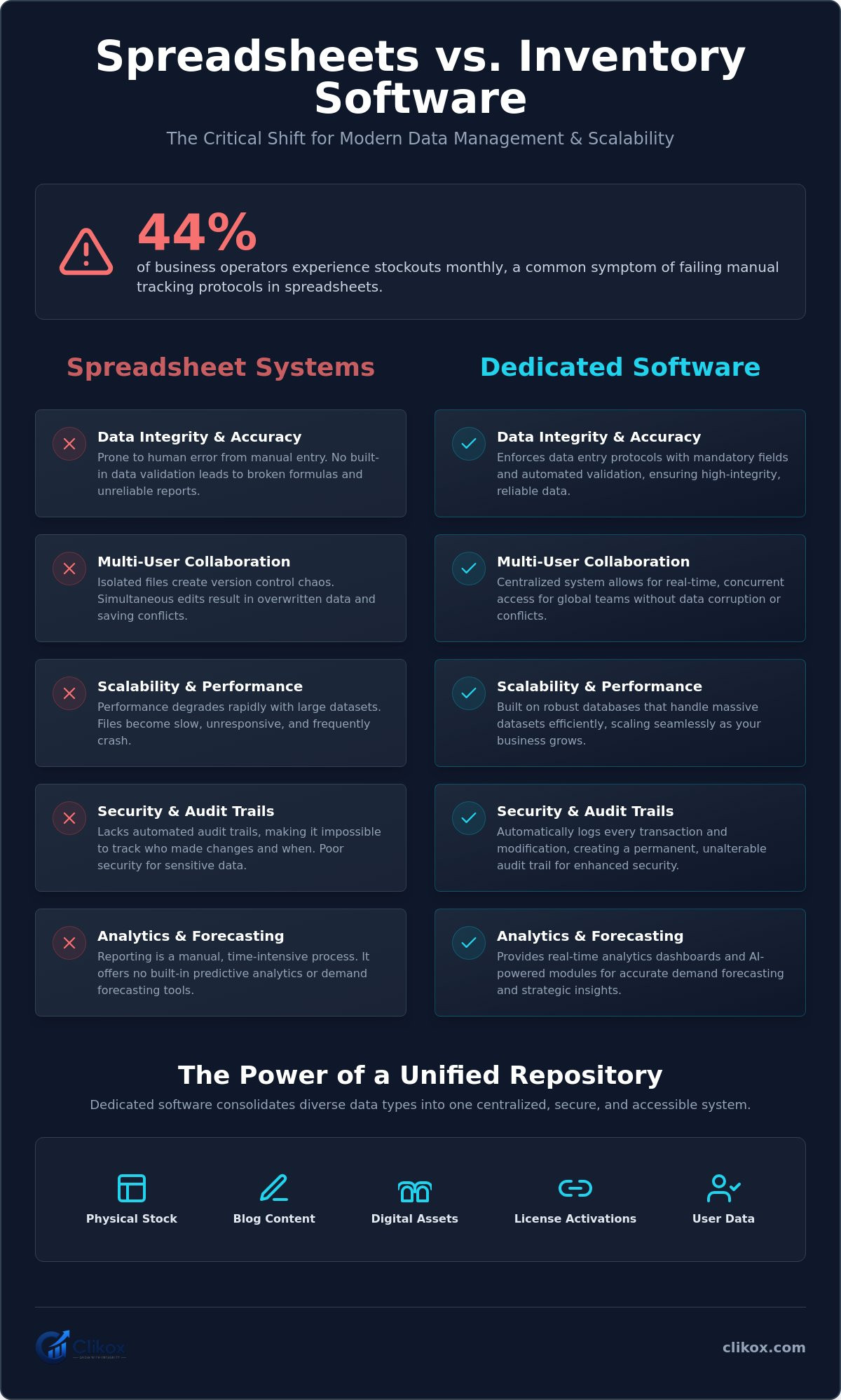
44% of business operators experience stockouts at least once every month according to the State of Inventory Management 2026 report. This frequency indicates a failure in manual tracking protocols. Most organizations utilize static spreadsheets for data management. These files remain prone to human error. They also suffer from data decay. This report explains why inventory software better than spreadsheets provides a more stable infrastructure for 2026. Manual systems lack the capacity for real-time updates. They don't synchronize data across multiple users. This leads to information silos and operational friction.
You recognize that spreadsheets are a familiar tool for basic organization. They're often the first choice for initial data entry tasks. This article provides a clinical analysis of why dedicated software infrastructures outperform manual spreadsheet systems for inventory and data management. We compare functional differences in data integrity and system reliability. The following sections detail the benefits of a centralized data repository. We examine how automated tracking applies to both physical stock and digital assets like blog content. This comparison focuses on the reduction of operational complexity through standardized system architecture.
Key Takeaways
- Identify the structural limitations that make inventory software better than spreadsheets for maintaining long-term data integrity.
- Understand the organization of five distinct data types within a single centralized repository.
- Evaluate the security benefits of automated license activations compared to manual file sharing protocols.
- Learn standardized procedures for migrating legacy spreadsheet data into automated system infrastructures.
- Analyze the functional utility of unified dashboards for managing physical stock and digital content campaigns simultaneously.
The Structural Limitations of Spreadsheet-Based Inventory
Spreadsheets function as isolated files. They do not operate as centralized database systems. This architectural limitation prevents real-time data synchronization across different departments. Manual data entry creates high frequencies of clerical errors. It also leads to frequent data duplication. These errors compromise the reliability of the entire inventory record. Organizations often discover that inventory management software provides a more stable infrastructure. Dedicated systems use relational databases to maintain consistency. Spreadsheets exist as discrete documents stored on local drives. They lack the interconnectivity of a relational database. This isolation means that updates in one file don't reflect in others. Disconnected data pools emerge. These pools create a fragmented view of the organization's assets. Version control becomes impossible when multiple team members access the same file. One user often overwrites the work of another. There's a lack of automated audit trails. This prevents the tracking of specific user modifications. Admins can't identify who changed a value or when the change occurred. This lack of transparency makes inventory software better than spreadsheets for operational security.
Data Integrity and Human Error Protocols
Static cells don't validate data types automatically upon entry. A user can enter text into a numerical field without triggering a system alert. This leads to broken formulas. These errors often go undetected until significant operational discrepancies occur. Formula errors propagate through linked sheets. One incorrect cell can invalidate an entire quarterly report. Manual auditing of these formulas is time-intensive. It requires significant labor hours that yield no productive output. The absence of mandatory fields is a primary structural flaw. It leads to incomplete inventory records. Missing data points disrupt procurement cycles and financial reporting. Automated systems enforce data entry protocols. They require specific inputs before a record can be saved. This ensures that every data entry follows the established organizational logic. It maintains the integrity of the database without constant manual oversight.
Scalability and Multi-user Access Constraints
File-based systems experience performance degradation as row counts increase. Large spreadsheets become slow to load. They often crash during complex calculations. This instability increases as the business grows. Simultaneous editing frequently results in overwritten data. It also causes lost progress during file saving conflicts. Two users can't modify the same cell at the same time without risk. Remote teams encounter latency issues when accessing large local spreadsheet files over a network. This delay reduces administrative efficiency. Centralized software uses server-side processing to handle large datasets. It supports concurrent users without data corruption. It provides a stable environment for global teams. This performance stability is why inventory software better than spreadsheets is the preferred standard for scalable operations. It allows for growth without compromising system speed or data safety.
Functional Advantages of Dedicated Inventory Software
Dedicated software systems operate as active infrastructures. They provide functional capabilities that static files cannot replicate. Centralized data management allows for the organization of five distinct data types. These categories include physical stock, blog content, and three additional administrative datasets. Automated license activation systems ensure secure and regulated access. Only authorized users interact with the system environment. Real-time analytics dashboards provide immediate visibility into stock levels. They also monitor active marketing campaigns. Systematic categorization occurs in one centralized digital space. This architecture reduces the time required for administrative cross-referencing. The system maintains a constant state of readiness. It functions as an invisible architect for organizational data. This structural advantage makes inventory software better than spreadsheets for complex business environments. It eliminates the need for manual file management.
Automated Data Tracking and Analytics
Software systems provide automated logging of every inventory movement. Every transaction creates a discrete, unalterable data point. This process generates a permanent audit trail for all assets. Predictive analytics modules assist in demand forecasting. These modules utilize historical data to project future stock requirements. AI-powered forecasting tools became a standard industry practice in 2026. These tools reduce holding costs by analyzing sales trends and seasonality. Reporting tools generate standardized documentation for administrative review. This removes the need for manual report compilation. Data visualization tools replace static tables with dynamic charts. Managers rely on live data streams rather than historical snapshots. This shift ensures that decision-making remains grounded in current operational reality. Automation protocols handle repetitive tasks without human intervention.
Centralized Repositories for Multiple Data Types
Inventory software manages physical stock alongside digital assets like blog content. This integration addresses a common gap in traditional management strategies. Most legacy systems ignore the relationship between product availability and marketing materials. A unified system reduces the need for multiple disparate software subscriptions. It consolidates diverse functions into one platform. Data silos are eliminated through a single administrative interface. Users access all relevant information from one dashboard. This includes inventory counts and content schedules. Standardizing your workflow through Clikox Inventory Software ensures all five data types remain synchronized. The administrative dashboard provides a clinical overview of all active campaigns. It tracks the status of physical goods and digital assets simultaneously. This unified approach prevents information fragmentation. It ensures that all departments operate from the same primary data source.
System stability remains a primary focus of dedicated software. Automated backup protocols protect the repository from data loss. These protocols execute without user prompts. They ensure that the database remains current and secure. Manual spreadsheet backups are often irregular and prone to failure. Dedicated systems provide a level of reliability that isolated files cannot achieve. The modular structure of these systems allows for rapid information delivery. Each data unit exists as a separate but linked component. This makes the system easy to navigate and scale. It supports the growth of the organization without increasing operational complexity.
Comparative Analysis: Spreadsheets vs. SaaS Platforms
SaaS platforms utilize a subscription-based deployment model. This model ensures continuous software updates without manual intervention. Spreadsheets remain static files. They require manual backup procedures to prevent total data loss. Modern software includes built-in security protocols for data encryption. These protocols protect sensitive operational information. User registration systems allow for granular control over data access. Administrators assign specific permissions based on organizational roles. This structured access management makes inventory software better than spreadsheets for data security. It creates a controlled environment for sensitive information. The system architecture prioritizes data safety through automated redundancy. Isolated files lack these integrated safety measures.
Real-time Updates vs. Static Files
Cloud-based platforms reflect changes across all devices instantaneously. This synchronization eliminates the need for manual file sharing. Spreadsheets require manual saving and distribution to update team members. This delay creates information lags. Automated notifications alert users to low stock levels. They also provide warnings for upcoming campaign deadlines. In 2026, cloud-based solutions account for 61.2% of the market share according to Mordor Intelligence. This deployment model is the fastest-growing segment in the industry. It provides a level of responsiveness that static files cannot achieve. Real-time data access ensures that all departments operate with the same information. Static files lead to fragmented data pools.
Security and Permission Protocols
Inventory software utilizes role-based access control (RBAC). This system protects sensitive data from unauthorized viewing. Spreadsheets are often protected by a single password. This password is easily compromised. It does not provide individual accountability. Software systems maintain a permanent record of all user login activity. They log every data modification. This audit trail ensures complete transparency. Encryption protocols secure data both at rest and in transit. These measures prevent unauthorized data extraction. Isolated spreadsheets lack these integrated security layers. Granular access control prevents internal data leaks. Users only see the information necessary for their specific tasks. A warehouse worker sees stock levels. A marketing manager sees campaign data. This separation of duties is difficult to enforce in a shared spreadsheet. One error by a single user can compromise the entire document. Software systems isolate user actions to prevent systemic failure.
System stability depends on automated infrastructure. SaaS providers manage the underlying hardware and server environment. This reduces the technical burden on the end-user. Spreadsheets rely on the local device's hardware and operating system. Any local system failure can result in permanent file corruption. Professional platforms distribute data across multiple secure servers. This redundancy ensures high availability and disaster recovery. The systematic arrangement of security features provides a reliable environment for critical business data. Manual backup procedures for spreadsheets are often inconsistent. Users must remember to save copies at regular intervals. Dedicated software automates this process entirely. It removes the risk of human forgetfulness. This automated approach ensures that the database remains current and protected at all times.
Transitioning from Manual Files to Centralized Systems
The transition from manual files to a centralized system is a technical migration. It involves moving data from isolated documents into a structured database environment. This process validates why inventory software better than spreadsheets is the operational standard for 2026. Standardization is the primary requirement for a successful transition. It ensures that existing data fields align with the software's architecture. A structured approach prevents data loss during the transfer. It also establishes a foundation for automated tracking protocols. This migration shifts the organization from a reactive state to a proactive infrastructure.
Data Preparation and Cleaning
Data preparation begins with a thorough audit of existing files. Remove all duplicate entries to maintain a clean repository. Resolve formatting inconsistencies in date and currency fields. These errors often cause import failures in automated systems. Each spreadsheet column must correspond to a specific data type in the software. This mapping process ensures that numerical data remains searchable and functional. Administrative teams should follow specific protocols for importing inventory data from spreadsheets to ensure accuracy. Verifying current stock levels provides a reliable starting point. It prevents the migration of historical clerical errors into the new system. A clean baseline is essential for predictive analytics modules to function correctly. This step ensures that the system provides accurate forecasting from the first day of operation.
License Activation and User Onboarding
License activation is the next functional step in the transition. Distribute activation keys to all relevant team members. This allows each user to access the centralized tracking environment. Configure user permissions within the administrative dashboard. Role-based access control limits data visibility to authorized personnel. One user may manage physical stock while another manages digital content. This separation of duties protects sensitive organizational data. It also prevents accidental data deletion by unauthorized staff. Conduct a functional analysis of all system modules. Verify that the reporting tools and notification systems are active. This testing phase ensures that the system is ready for live operations. Systematic onboarding minimizes the risk of user error during the initial deployment phase. It prepares the team for a standardized workflow.
Implementing a centralized system provides a stable infrastructure for long-term data management. It replaces fragmented files with a unified source of truth. This shift reduces the time spent on manual data reconciliation. You can initiate this migration by obtaining Clikox Inventory Software today. It offers the necessary features for secure and efficient data organization. The system is designed to handle complex data migrations with minimal operational downtime. It ensures that your inventory and content data remain synchronized and accessible.
Clikox: A Unified Solution for Inventory and Content Data
Clikox Inventory Software operates as a centralized repository for diverse organizational datasets. The platform manages inventory, blogs, and three other data types in one environment. This integration eliminates the need for isolated files. Functional analysis reveals a systematic approach to data centralization. Users access a unified interface to monitor all assets. This structural consistency ensures that all data remains synchronized. It provides a level of reliability that manual systems don't replicate. The system architecture supports the growth of the organization without increasing administrative friction. This precision makes inventory software better than spreadsheets for modern data management. It ensures that every record remains accurate and accessible.
Unified Management of Inventory and Blogs
The platform allows for the simultaneous tracking of products and content assets. Users organize, track, and share their work within a modular interface. This interface categorizes every data point into specific functional units. Centralization reduces operational complexity for content and supply chain teams. It ensures that blog content remains linked to physical stock levels. This connection prevents the promotion of out-of-stock items. Content teams see live inventory data before scheduling campaigns. Supply chain teams see upcoming marketing efforts. This visibility coordinates departments through a single source of truth. It removes the information silos created by separate tracking files.
Administrative Dashboard and Campaign Tracking
The administrative dashboard provides a clinical overview of all active campaigns. It displays real-time analytics for all five data categories. Campaign management tools allow for the systematic tracking of marketing efforts. The system maintains a clinical record of all organizational workflows. This logging ensures complete transparency for all user actions. Managers review performance data through standardized reports. These reports generate automatically from the central database. The dashboard presents information in a staccato, easy-to-navigate format. It prioritizes data utility over visual flourishes. This focus on functional clarity assists in rapid decision-making. It provides an immediate snapshot of current operational status.
The system infrastructure includes all necessary tools for collaborative team work. License activations provide secure access for all team members. Each user operates within a regulated environment. The platform ensures that data remains encrypted and protected. It provides a stable foundation for long-term organizational health. Users don't experience the data decay associated with legacy files. The software maintains a constant state of operational readiness. It functions as an invisible architect for the company's data. This systematic arrangement of tools ensures that the business remains organized and efficient in 2026. The transition to this platform standardizes all internal protocols. It creates a reliable environment for critical asset management.
Optimizing Data Infrastructure for 2026
Manual tracking systems suffer from inherent structural decay. Isolated spreadsheets create information silos and high frequencies of clerical error. Transitioning to a centralized repository eliminates these operational risks. Dedicated software provides a stable environment for multi-user synchronization. It ensures that all organizational data follows a standardized logic. This functional precision is why inventory software better than spreadsheets is the necessary infrastructure for scalable businesses. Manual files don't maintain a constant state of readiness for all users.
Organizations benefit from the centralized management of 5 data types. The SaaS license activation system secures access for all team members. An integrated administrative analytics dashboard provides a clinical overview of active campaigns. These tools replace manual reconciliation with automated precision. They ensure that every data point remains accurate and verifiable. You can establish this infrastructure today. Register for Clikox Inventory Software to begin the centralization process. This transition secures your data integrity for future growth.
Frequently Asked Questions
Is inventory software better than Excel for small businesses?
Yes. Software provides automated validation and multi-user synchronization. Excel cannot sustain these functions as data volume increases. Spreadsheet cells don't enforce data types. Dedicated systems prevent clerical errors through mandatory fields and logic checks. This makes inventory software better than spreadsheets for maintaining long-term accuracy. Dedicated platforms support growth without performance degradation.
How do I move inventory from Excel to software?
The process requires data cleaning and column mapping. Remove duplicate entries from the source file before beginning the transfer. Align spreadsheet columns with the specific fields in the software database. Use a standardized import protocol to execute the data migration. This ensures that historical data remains compatible with the new system architecture. A clean baseline prevents the propagation of legacy errors.
Can multiple users edit a spreadsheet simultaneously?
Cloud-based spreadsheets allow simultaneous editing but lack granular control. These files don't provide role-based permissions. They also lack detailed audit trails to track specific user modifications. Dedicated software isolates user actions to prevent data overwriting. It maintains a permanent record of all modifications. This ensures individual accountability across the team. It prevents the loss of progress during concurrent sessions.
What are the security risks of spreadsheet inventory?
Primary risks include lack of encryption and unauthorized duplication. Spreadsheets rely on basic password protection. This level of security is easily bypassed. Isolated files don't generate user-specific activity logs. Unauthorized users can copy entire datasets without triggering alerts. Dedicated software uses role-based access control to secure sensitive information. It creates a regulated environment for organizational data.
Does inventory software include content management?
Some platforms integrate these functions to reduce operational complexity. Clikox manages inventory alongside blog content and three other data categories. This unified approach eliminates the need for separate software subscriptions. It allows content teams to verify stock levels before scheduling marketing campaigns. Centralization ensures that all digital assets remain synchronized with physical inventory. It creates a single source of truth for all departments.
How long does it take to set up inventory software?
Initial setup and license activation occur within minutes. Users receive activation keys immediately upon registration. Data migration time varies based on the complexity of existing records. Standardized files import rapidly. Complex datasets require additional time for cleaning and mapping. Most organizations achieve full system functionality shortly after the initial import. The administrative dashboard becomes operational as soon as the database is populated.