
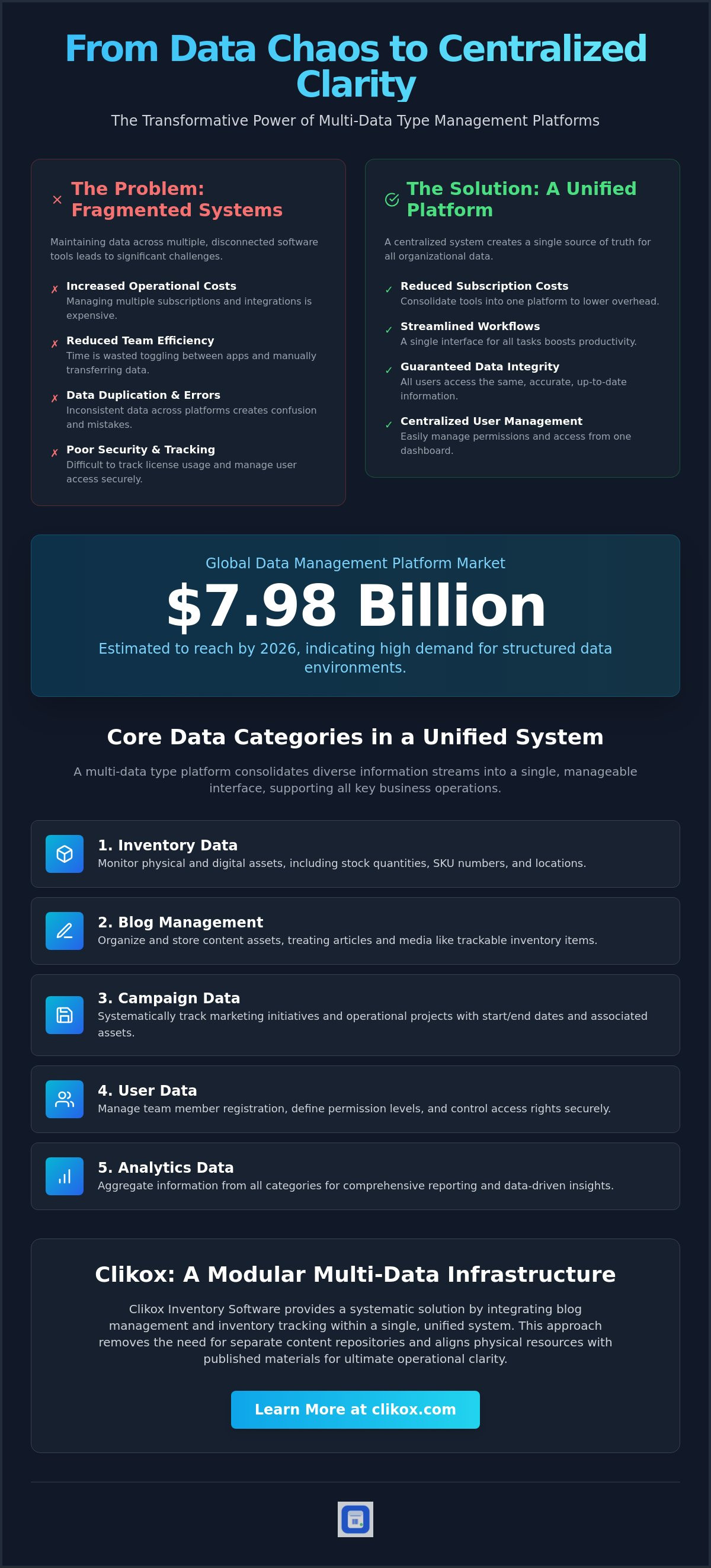
The global data management platform market is estimated to reach up to 7.98 billion dollars in 2026. This valuation indicates a high demand for structured data environments. Teams frequently maintain data across multiple software tools. This fragmentation increases operational costs. It also reduces efficiency. A multi-data type management platform provides a necessary infrastructure for centralizing these disparate workflows. It acts as a neutral system for the systematic arrangement of inventory and content data.
Data fragmentation leads to difficulties in tracking license usage and user access. This article defines the technical role of multi-data type platforms in establishing a single source of truth for all team data. The text details the standardization of data entry protocols. It covers the centralization of user management. It provides a functional overview of Clikox Inventory Software and license activations. This guide outlines the specific steps for system implementation and workflow optimization.
Key Takeaways
- A multi-data type management platform functions as a centralized environment for processing distinct data categories. It consolidates diverse information streams into a single interface.
- The system manages five primary data types to support varied business operations. It provides specific tracking protocols for physical and digital inventory assets.
- Centralized systems replace disparate software solutions to reduce subscription costs and administrative overhead. They establish a uniform point of entry for team-wide data access.
- Robust user registration and permission protocols ensure secure team synchronization. License activation procedures maintain authorized access to the modular infrastructure.
- Clikox Inventory Software integrates blog management and inventory tracking within a unified system. It offers a systematic approach to organizing organizational data.
What is a Multi-Data Type Management Platform?
A multi-data type management platform is a centralized digital environment. It processes multiple distinct data categories within a single interface. This system functions as a neutral infrastructure for the systematic arrangement of operational data. It eliminates the requirement for separate software instances for disparate tasks. Users don't need to toggle between different applications to manage their workflows. This centralization provides a clear view of all organizational assets.
The infrastructure supports both structured inventory data and unstructured content types. Structured data includes specific parameters like stock quantities, SKU numbers, and warehouse locations. Unstructured data refers to information like blog posts, product descriptions, and internal documentation. A standard Data Management Platform typically handles marketing segments. A multi-data type system manages the actual items and the content associated with them. It acts as a single point of entry for team members.
The Role of Centralisation in Data Integrity
Centralization reduces the risk of data duplication across team workflows. Teams often experience errors when using multiple tools. One tool might show a different stock level than another. A single repository ensures that all users access the same version of a data point. This creates a reliable source of truth for the entire organization. Consistency is maintained through automated updates within the platform.
The system provides a unified framework for tracking and sharing work. It records every entry and modification. This transparency allows managers to monitor data access and usage. Users don't have to verify information across different databases. They rely on the central system for accuracy. This protocol protects the integrity of the data over time. It prevents the decay of information that occurs in fragmented environments.
Operational Efficiency Through Unified Architectures
Unified architectures decrease the time spent on cross-platform data migration. Manual data transfer is slow. It often introduces human error into the system. The platform automates the flow of information between categories. Users input data once. The system then categorizes it according to predefined protocols. This automation saves time for administrative staff. It allows for a higher volume of data processing without additional resources.
Standardized interfaces allow for rapid scanning and data retrieval. The visual layout remains consistent regardless of the data type being viewed. This consistency speeds up the navigation process. The modular design facilitates the addition of new data types without system disruption. Teams can expand their operations without rebuilding their data infrastructure. A multi-data type management platform scales alongside the business. It provides a stable foundation for long-term data management.
Core Data Categories Managed within a Unified System
The multi-data type management platform organizes information into five primary categories. This structure supports the functional requirements of a team. Inventory data tracking involves the monitoring of physical or digital assets. It records the current quantity of items. It records the specific location of each asset. Blog management includes the organization and storage of content assets. The platform maintains a repository of text files and associated media. Campaign data allows for the systematic tracking of marketing or operational initiatives. It catalogs the start and end dates of specific projects. User data encompasses registration details and permission levels. It defines the access rights for each individual team member. Analytics data provides the final layer of the unified system. It aggregates information from the previous four categories for reporting.
Integrating Inventory and Blog Repositories
The system treats blog posts as discrete inventory items. This method applies inventory logic to digital content. Users categorize content assets using the same modular structure as physical stock. Each article functions as a tracked unit within the database. This integration allows teams to manage content and inventory in one place. It removes the necessity for disparate content repositories. Administrators view stock levels through the interface. They also view content schedules. This creates operational clarity. Organizations use this feature to align their physical resources with their published materials. For those seeking a systematic solution, Clikox Inventory Software organizes these data types within a unified framework.
Campaign and Analytics Data Management
Campaign management features allow for the organization of time-sensitive projects. These features link inventory items to specific goals. The platform tracks the movement of assets during a campaign. Integrated analytics provide reporting on data trends across all five types. The system processes raw data into categorized summaries. The dashboard delivers objective data points for administrative review. It presents information in a list-oriented flow. This allows for the rapid identification of operational bottlenecks. Standardized reporting protocols ensure that all team members view the same metrics. The system updates these metrics to reflect current activity. This ensures that the data remains accurate for all users.
Evaluating Centralised Platforms vs. Disparate Software Solutions
Disparate software solutions require multiple subscription fees. These systems also require separate login credentials for every user. This increases the administrative burden on the IT department. Managing several accounts leads to security risks. Centralized platforms provide a single point of entry for all team members. This simplifies user access. It reduces the time spent on credential management. A multi-data type management platform consolidates these requirements into one system. This consolidation minimizes the financial overhead of maintaining multiple software licenses. It allows organizations to allocate their budget to a single, comprehensive tool.
Data silos occur when information is stored in isolated, non-communicating systems. These silos prevent the flow of information between departments. One team cannot see the data generated by another team. This isolation leads to conflicting reports. A unified platform maintains data consistency by using a standardized database schema. This schema ensures that every data point follows the same organizational rules. It allows different data types to exist within the same environment without conflict. The multi-data type management platform processes all inputs through this single schema. This ensures that inventory levels and content assets are mapped to the same organizational structure.
Reducing Operational Complexity
The system replaces multiple complex tools with one functional interface. This reduction in software variety simplifies the technical stack. Standardized templates reduce the learning curve for new team members. They don't need to learn different navigation patterns for each task. Minimalist design ensures that focus remains on data utility rather than software navigation. The interface prioritizes essential functions. This prevents user fatigue. It ensures that the system remains a tool for data management rather than a source of distraction.
Maintenance of Data Consistency
Consistent data formats facilitate accurate reporting and campaign analysis. The system prevents the fragmentation of information across different software versions. Every user interacts with the same software build. This uniformity eliminates the risk of version mismatch. Standardized data entry protocols ensure high data quality across the team. These protocols require users to follow specific steps when entering new records. The software enforces these rules automatically. This automated enforcement results in a reliable dataset for administrative review. It allows for a precise evaluation of operational performance.
Protocols for Team Data Synchronisation and License Management
Team synchronization requires a robust user registration and permission system. This system manages the flow of information between different team members. It ensures that data remains secure during collaborative tasks. Integrating a multi-data type management platform necessitates clear administrative protocols. These protocols define how users interact with the database. The software supports both solo users and collaborative team environments. Solo users maintain full control over their local data. Collaborative environments require shared access points. Administrative dashboards allow for the oversight of customer and content data. This dashboard provides a summary of all active sessions. It displays the status of data entries across the organization.
License activation procedures ensure that only authorized users access the platform. This step is mandatory for initiating a new software instance. It verifies the validity of the installation. Unauthorized access is prevented through these security checks. The system records the machine identity for every active license. This record-keeping facilitates the tracking of software usage. It ensures compliance with the terms of service. Administrators monitor these activations through the central dashboard. They can revoke access if a device is no longer in use. This level of control is essential for maintaining a secure data environment. It prevents the dilution of data integrity through unauthorized entries.
User Roles and Permission Structures
Defined user roles restrict access to sensitive inventory or campaign data. Not every user requires access to every data category. The system allows for the assignment of specific administrative privileges. Some users only have read-only access. Others possess the authority to modify records. Registration protocols maintain a secure record of all system participants. This record includes the date of registration and the assigned role. It creates a clear audit trail for all data modifications. Administrators use this trail to identify the source of any data errors. This structure prevents unauthorized data tampering. It maintains the reliability of the centralized repository.
License Activation and Subscription Management
License activation is a mandatory step for initiating a new software instance. This process links the software to a specific user or organization. Subscription-based models provide recurring access to the centralized platform. These models ensure that the software remains up to date. The admin dashboard facilitates the management of multiple license tiers. Different tiers offer varying levels of data storage and user capacity. Organizations select the tier that matches their current operational scale. They can upgrade or downgrade as their requirements change. Users can obtain License Activations to enable full system functionality. This ensures that the team has continuous access to the modular infrastructure. The dashboard provides a clear overview of expiration dates. It prevents service interruptions by alerting administrators to upcoming renewals.
Clikox Inventory Software: A Modular Multi-Data Infrastructure
Clikox provides a systematic solution for managing five distinct data types. The software functions as a dedicated multi-data type management platform. It facilitates the organization of blogs and inventory in one place. Users track work through a utilitarian interface. They share data through a centralized repository. The platform organizes work into discrete units. The software includes built-in analytics. It includes campaign management features. License activations are available for individuals. They are also available for collaborative teams. This modularity supports different operational scales. Organizations use the system to consolidate their technical stack.
Campaign management allows for the organization of projects. Users define the start date. They define the end date. The system tracks the assets used during the campaign. This includes physical inventory. It includes digital content. The multi-data type management platform records all changes. It maintains a clinical history of all actions. This history provides accountability for the team. Users access these records through the administrative dashboard. The system updates in real time. This ensures that the information is always current. It prevents the use of outdated data points.
Core Features of the Clikox Platform
The admin dashboard provides a clinical overview of all managed data. It presents information in a list-oriented flow. This layout allows for rapid navigation. The system supports the systematic tracking of inventory. It supports the tracking of content assets. Users monitor physical stock levels through the interface. They monitor digital blog repositories through the same system. Analytics features deliver objective reports on team performance. These reports use raw data points. They provide a neutral assessment of organizational efficiency. The dashboard avoids descriptive adjectives. It focuses on literal data categorization. This ensures that users don't waste time on non-essential information.
Implementation and Next Steps
Initial setup involves user registration. It involves license activation. These processes secure the data environment. Teams begin centralizing data by migrating existing inventory lists. They use standardized templates for this migration. This ensures that all records follow the same schema. The platform remains a stable infrastructure for long-term data management. It scales without system disruption. Users add new data types through the modular interface. This process is methodical. It follows established protocols. Clikox is an offline software designed for Windows. It offers a 7-day free trial for initial system testing. Visit clikox.com for further technical specifications. The site lists all administrative functions. It details the steps for system installation.
Implementing Centralised Data Infrastructure
Centralization reduces the complexity of team workflows. It eliminates the financial and operational burden of managing disparate software tools. A multi-data type management platform functions as the necessary foundation for this organizational transition. The system provides a single repository for five distinct data types. This structure includes the integration of blogs and inventory within one clinical interface. Integrated license activation ensures that only authorized users access the database environment. User management protocols maintain secure data synchronization across the entire organization. Teams don't need to verify information across multiple platforms. The utilitarian admin dashboard delivers precise data tracking for all managed assets. It allows for the rapid scanning of stock levels and content schedules. This architectural approach creates a reliable and permanent source of truth. Organizations can now proceed with the implementation of these systematic protocols. Each data point remains consistent across all user instances. Access Clikox Inventory Software to initiate the centralization of your team data. System stability is achievable through these standardized arrangements.
Frequently Asked Questions
What are the five data types managed by Clikox?
Clikox manages five primary data categories. These include inventory, blogs, campaigns, users, and analytics. The system organizes these categories within a unified framework. This arrangement supports diverse business functions. Each category functions as a discrete unit within the database. Users manage these types through a single interface for maximum administrative efficiency.
How does the platform handle blog content alongside inventory?
The platform treats blog posts as discrete items within the inventory database. This allows for the systematic tracking of content assets. Users categorize these assets using the same modular structure as physical stock. This integration ensures that teams manage content and inventory in one place. It removes the requirement for separate content repositories and simplifies the technical stack.
Is the software suitable for individual users or only teams?
The software supports both solo users and collaborative team environments. Solo users maintain full control over their local data repositories. Teams benefit from shared access points and synchronization protocols. The system scales to meet the requirements of different organizational sizes. This flexibility allows for the management of a multi-data type management platform across various user configurations.
How does license activation work for new users?
License activation is a mandatory step for initiating a new software instance. This process verifies the validity of the installation on a specific machine. It links the software to a user or organization. Administrators manage these activations through the central dashboard. This procedure ensures that only authorized users access the system infrastructure and prevents unauthorized data tampering.
Can I track marketing campaigns within the inventory software?
Users can track marketing campaigns within the software. The campaign management features allow for the organization of time-sensitive projects. These features link inventory items to specific campaign goals. The system records the movement of assets during these initiatives. This provides a clear history of all campaign-related data entries for objective administrative review.
What features are included in the administrative dashboard?
The administrative dashboard provides a clinical overview of all managed data. It includes features for user oversight and license management. The dashboard displays a summary of all active sessions. It provides status updates for data entries across the organization. This utilitarian interface prioritizes functional clarity and allows for the rapid identification of operational bottlenecks.
Does the platform provide analytics for data tracking?
The system provides integrated analytics for data tracking. These features deliver objective reports on team performance across all data types. The analytics engine processes raw information into categorized summaries. This allows for the rapid identification of operational trends. Administrators use these data points for systematic review and decision-making without navigating complex external tools.
How does the system ensure data remains centralised for remote teams?
The system ensures data centralization through a standardized database schema. This schema enforces uniform data entry protocols for all participants. A multi-data type management platform requires a robust user registration and permission system. These protocols maintain a secure record of all participants. Remote teams access the same version of a data point through this centralized repository.